
VisualStudioCode: Difference between revisions
| Line 1: | Line 1: | ||
==Concept== | ==Concept== | ||
Visual Studio Code ( | Visual Studio Code (VSC) | ||
==Configuration== | ==Configuration== | ||
Revision as of 09:32, 6 January 2025
Concept
Visual Studio Code (VSC)
Configuration
Debugging
- in
/.vscode/launch.jsonthere are the debug configurations which can selected by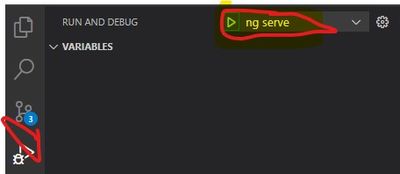

Installation
AWS Toolkit Extension
installed 'AWS Toolkit' via side menu 'extensions' 
Chrome Debugger
- installed Debugger for Chrome via side menu 'extensions'

Operation
(Un-)Comment Block
- CTRL+K+C/U
Add Project to Workspace Window
- right click in empty part of Workspace window -> Add folder to Workspace
Open Angular Project
cd <ROOT_FOLDER>
code .
Select Python Interpreter
CRTL + SHIFT + P
Working with Python Virtual Environments
see here
Format a JSON File
- SHIFT + ALT + F