MSPowerBI: Difference between revisions
| Line 25: | Line 25: | ||
* [[File:PowerBI_7.PNG|200px]] | * [[File:PowerBI_7.PNG|200px]] | ||
* next step delete the rows to the right | * next step delete the rows to the right | ||
* rename column to the original name (w/o .1 suffix) | |||
====Adjust Query==== | ====Adjust Query==== | ||
Revision as of 15:14, 24 February 2022
Information
- extension for local saves is *.pbix
Views

- Berichtsansicht
- Datenansicht
- Beziehungsansicht

Ressources
https://www.youtube.com/watch?v=AuYzsfXKkbM
Operation
Import Data from Excel
General Information
Power Query Editor always works with a preview of the data, to make the development process fast. When you load the data in Power BI, transformations will be applied on the entire dataset. Hence errors might have not been identified before the full import of data.
Steps
- select import and file
- select transform (not load)
- delete rows above headers (e.g. filter sums) by

- set first row as header line by

- delete columns not needed by right click -> delete


N charactors from left
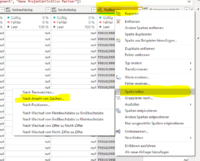
- next step delete the rows to the right
- rename column to the original name (w/o .1 suffix)

Adjust Query

Error Handling
Export Data to Excel
- move or right click in header
- select dots
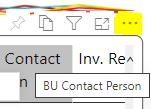
- select export data