
SpringBoot
Introduction
- Framework to build microservices
- common non-functional features
- not zero code generation
- not a web or application server
- provides starter projects
- embedded server (incl. in application jar)
- externalized configuration
Concepts
- SpringBoot Autoconfiguration: by scanning the classpath
- Dispatcher Servlet
- SpringBoot Actuator (for monitoring)
Security
adding to pom.xml:
<dependency>
  <groupId>org.springframework.boot</groupId>
  <artifactId>spring-boot-starter-security</artifactId>
</dependency>
and update the project automatically sets up form-based authentication with a generated session cookie generated on the server or basic authentication with a header sent along with every request
- user='user
- pwd=see console output of server start
or set it in application.properties
spring.security.user.name=uwe
spring.security.user.password=uwe
This has to be entered just once.
Testing
<dependency>
  <groupId>org.springframework.boot</groupId>
  <artifactId>spring-boot-starter-test</artifactId>
  <scope>test</scope>
</dependency>
This integrates the frameworks JUnit, Hamcrest, Mockito,
Configuration
Application Properties
in \<Project>\src\main\resources\application.properties
logging.level.org.springframework = debug

#security configuration see here

#H2 database configuration see here

#logging configuration see here
Logging
A good description is here. The default log output is
<DATE>
To implement logging
import org.slf4j.Logger;
import org.slf4j.LoggerFactory;
final static Logger logger = LoggerFactory.getLogger(BookmarksRestController.class);  // is the LOGGER_NAME
BookmarksRestController.logger.trace(...
The general configuration in application.properties:
# a selection of core loggers (embedded container, Hibernate, and Spring Boot) are configured to output more information
debug=true

# enables trace logging for a selection of core loggers (embedded container, Hibernate schema generation, and the whole Spring portfolio)
trace=true

logging.file.name=./log/bookmarks.log
logging.logback.rollingpolicy.max-history=5
# double backslash quote for policy and logback
logging.pattern.file=%d{yyyy-MM-dd HH:mm:ss} [%thread] %-5level %logger{1}.%M{}\\(\\) - %L: %m%n
logging.pattern.console=%d{yyyy-MM-dd HH:mm:ss} [%thread] %-5level %logger{1}.%M{}\\(\\) - %L: %m%n
The specific configuration can be set according to package/class hierachy:
logging.level.<PACKAGE_NAMEn>=<LEVEL>
logging.level.<PACKAGE_NAME1.PACKAGE_NAME2>=<LEVEL>
logging.level.<PACKAGE_NAME1.PACKAGE_NAME2.CLASSNAME>=<LEVEL>
// e.g.
logging.level.com.uweheuer=INFO
logging.level.com.uweheuer.bookmarks=TRACE
logging.level.com.uweheuer.bookmarks.entities=INFO
Implementation
Main Application
see /test1/src/main/java/com/uweheuer/springboot/test1/Test1Application.java/
@SpringBootApplication
public class Test1Application {
  ...
  public static void main(String[] args) {
    SpringApplication.run(Test1Application.class, args);
  }
  ...
@SpringBootApplication
is a convience annotation that adds @Configuration, @EnableAutoConfiguration, @EnableWebMvc and @ComponentScan.
Rest Controller
import org.springframework.web.bind.annotation.GetMapping;
import org.springframework.web.bind.annotation.RestController;

@RestController
@CrossOrigin(origins="http://localhost:4200") // avoid cross origin errors in browser
public class HelloWorldController
{
  // @RequestMapping(method=RequestMethod.GET, path="/hello-world")
  @GetMapping(path="/hello-world")
  @JsonView(MenuView.NodeView.class) // tells Jackson to propagate the view class to the entities for json-fication the return value
                                     // the same annotation has to be used at attributes in the JPA entities, which should be used for this view
  public <METHOD>() {
    ...
  }
@RequestMapping
@RequestMapping("/") // by default it maps HTTP operations
Integration Test
@SpringBootTest
class BookmarksApplicationTests {

  @Test
  void contextLoads() {
  }
}
Resources
Examples
Udemy Course
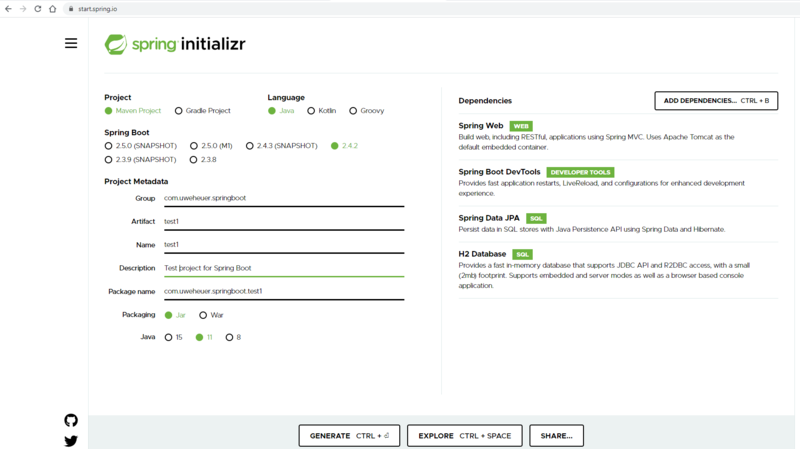
- start eclipse
- File -> Import -> Maven Project

Bookmarks
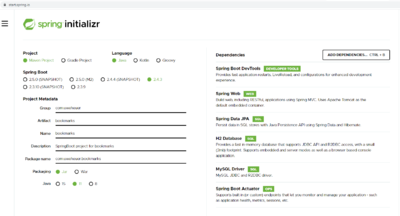
- start eclipse
- File -> Import -> Maven -> Existing Maven Projects
- select
C:\Uwes\eclipse\workspace_2020-12\SpringBoot\bookmarks

Database Configuration
The default is that the datasource url is generated randomly and printed to the console. The default user is 'sa', default password is empty.
spring.profiles.active=[dev|laptopmysql|raspberry]
- and created in
\bookmarks\src\main\resources\dedicated property filesapplication-[dev|laptopmysql|raspberry].properties
H2 Database Configuration
- see
application-dev.properties
# to make the h2 database url constant, otherwise it is a random url
spring.datasource.url=jdbc:h2:mem:bookmarksdb
# user and password for H2 console
spring.datasource.username=uwe
spring.datasource.password=uwe
Test Data for Startup
- in
<PROJECT_DIR>/src/main/resources/data.sql
Links
- see My Bookmarks -> Web-Präsenz -> localhost -> SpringBoot -> Bookmarks
ToDos
- JSON rest APIs
- adjust maven build
- build entities
- The @ManyToOne association uses FetchType.LAZY because, otherwise, we’d fall back to EAGER fetching which is bad for performance.
- https://thorben-janssen.com/ultimate-guide-derived-queries-with-spring-data-jpa/ Query Documentation]
- Sorted Lists
- http://assarconsulting.blogspot.com/2009/08/why-hibernate-does-delete-all-then-re.html
- https://stackoverflow.com/questions/13101882/jpa-onetomany-list-vs-set/29562678
- https://www.google.com/search?q=jpa+onetomany+list+or+set&rlz=1C1GCEU_deDE848DE867&ei=-iFTYO3XHJWj1fAPw5mgqAM&oq=JPA+%40one2many+list&gs_lcp=Cgdnd3Mtd2l6EAEYATIGCAAQFhAeMgYIABAWEB4yBggAEBYQHjIGCAAQFhAeMgYIABAWEB4yBggAEBYQHjIGCAAQFhAeMgYIABAWEB4yBggAEBYQHjIGCAAQFhAeOgcIABBHELADOggIABAWEAoQHlDLIViCJWC1UmgCcAJ4AIABhgGIAdkDkgEDNC4xmAEAoAEBqgEHZ3dzLXdpesgBCMABAQ&sclient=gws-wiz
- Sorted Lists