
SpringBoot: Difference between revisions
| Line 170: | Line 170: | ||
====@RequestMapping==== | ====@RequestMapping==== | ||
import org.springframework.web.bind.annotation.RequestMapping; | |||
@RequestMapping("xyz") // no need of backslash, all URLs of the mappings have the prefix 'xyz', method mappings need to include the / after the prefix e.g. http://localhost/xyz/do_something | @RequestMapping("xyz") // no need of backslash, all URLs of the mappings have the prefix 'xyz', method mappings need to include the / after the prefix e.g. http://localhost/xyz/do_something | ||
public class XYZControler { | public class XYZControler { | ||
Revision as of 10:25, 17 November 2022
Introduction
- Framework to build microservices
- common non-functional features
- not zero code generation
- not a web or application server
- provides starter projects
- embedded server (incl. in application jar)
- externalized configuration
Installation
Concepts
- SpringBoot Autoconfiguration: by scanning the classpath
- Dispatcher Servlet
- SpringBoot Actuator (for monitoring)
Architecture
- Client -> Controller -> Service (Business Logic) -> Model
Rest
- see here
Application Context
The ApplicationContext is where Spring holds instances of objects that it has identified to be managed and distributed automatically. These are called Beans. The application context can also be autowired:
@Autowired
private ApplicationContext applicationContext;
Dependency Injection
Beans
- Beans are specified by class level annotations e.g.
@Component, @Service, @Repositoryetc. or by XML configuration. The annotations are hierachical meaning for example that there are more specialized annotations for@Component. @Beanis a special annotation on method level.- A java class becomes Spring Bean only when it is created by Spring
- On startup/runtime classes in the application will be scanned and each class annotated with spring annotations will be instantiated as beans and put into a global context (Spring applicationcontext).
- Entities are no beans
- You can autowire only those beans whose life-cycle are managed by Spring IoC container.
- Spring support @Autowire only for Spring Beans
- the default scope is singleton
Security
adding to pom.xml:
<dependency>
  <groupId>org.springframework.boot</groupId>
  <artifactId>spring-boot-starter-security</artifactId>
</dependency>
and update the project automatically sets up form-based authentication with a generated session cookie generated on the server or basic authentication with a header sent along with every request
- user='user
- pwd=see console output of server start
or set it in application.properties
spring.security.user.name=uwe
spring.security.user.password=uwe
This has to be entered just once.
Testing
<dependency>
  <groupId>org.springframework.boot</groupId>
  <artifactId>spring-boot-starter-test</artifactId>
  <scope>test</scope>
</dependency>
This integrates the frameworks JUnit, Hamcrest, Mockito,
Configuration
Spring Boot allows you to externalize your configuration. You can use properties files, YAML files, environment variables and command-line arguments to externalize configuration which are evaluated in a specific order (see here).
Application Properties
in \<Project>\src\main\resources\application.properties
logging.level.org.springframework = debug
# Profile setting
spring.profiles.active=dev

# security configuration see here

# MySQL configuration see here

# H2 database configuration see here

# logging configuration see here

# actuator see here
Logging
Spring Boot is using LogBack as a logging proivder by default. It is not totally clear which configuration has which impact (application.properties, log-back-spring.xml).
A good description is here. The default log output is
<DATE>
To implement logging
import org.slf4j.Logger;
import org.slf4j.LoggerFactory;
final static Logger logger = LoggerFactory.getLogger(BookmarksRestController.class);  // is the LOGGER_NAME
BookmarksRestController.logger.trace(...
The general configuration in application.properties:
# a selection of core loggers (embedded container, Hibernate, and Spring Boot) are configured to output more information
debug=true

# enables trace logging for a selection of core loggers (embedded container, Hibernate schema generation, and the whole Spring portfolio)
trace=true

logging.file.name=./log/bookmarks.log
logging.logback.rollingpolicy.max-history=5
# double backslash quote for policy and logback
logging.pattern.file=%d{yyyy-MM-dd HH:mm:ss} [%thread] %-5level %logger{1}.%M{}\\(\\) - %L: %m%n
logging.pattern.console=%d{yyyy-MM-dd HH:mm:ss} [%thread] %-5level %logger{1}.%M{}\\(\\) - %L: %m%n
The specific configuration can be set according to package/class hierachy:
logging.level.<PACKAGE_NAMEn>=<LEVEL>
logging.level.<PACKAGE_NAME1.PACKAGE_NAME2>=<LEVEL>
logging.level.<PACKAGE_NAME1.PACKAGE_NAME2.CLASSNAME>=<LEVEL>
// e.g.
logging.level.com.uweheuer=INFO
logging.level.com.uweheuer.bookmarks=TRACE
logging.level.com.uweheuer.bookmarks.entities=INFO
LogBack
- good description here
/src/main/resource/log-back-spring.xml
Actuator
- standard monitoring, status information, ...
- add dependency to pom.xml
- configure the available endpoints in application.properties
management.endpoints.web.exposure.include=env,health,info
- example implementation in Heroku Demo Project
Implementation
Package Structure
There are two main approaches: structure by layer or structure by feature. It seems that a structure by feature is the most commonly used.
Static Content
\src\main\resources\static\will be used in Spring Boot application by copying to\target\classes\static\- sources which have to be transpiled like Angular apps should not be located here but in a separate directory
\src\main\resources\<APP>\ - for Angular:
- adjust angular.json with
"outputPath": "../../main/resources/static/",
Main Application
see /test1/src/main/java/com/uweheuer/springboot/test1/Test1Application.java/
@SpringBootApplication
public class Test1Application {
  ...
  public static void main(String[] args) {
    SpringApplication.run(Test1Application.class, args);
  }
  ...
@SpringBootApplication
is a convience annotation that adds @Configuration, @EnableAutoConfiguration, @EnableWebMvc and @ComponentScan which enables e.g. Auto-Configuration
Rest Controller
import org.springframework.web.bind.annotation.GetMapping;
import org.springframework.web.bind.annotation.RestController;

@RestController
@CrossOrigin(origins="http://localhost:4200") // avoid cross origin errors in browser
@RequestMapping("xyz")
public class HelloWorldController
{
  // @RequestMapping(method=RequestMethod.GET, path="/hello-world")
  @GetMapping(path="/hello-world")
  @JsonView(MenuView.NodeView.class) // tells Jackson to propagate the view class to the entities for json-fication the return value
                                     // the same annotation has to be used at attributes in the JPA entities, which should be used for this view
  public <METHOD>() {
    ...
  }
@RequestMapping
import org.springframework.web.bind.annotation.RequestMapping;

@RequestMapping("xyz") // no need of backslash, all URLs of the mappings have the prefix 'xyz', method mappings need to include the / after the prefix e.g. http://localhost/xyz/do_something
public class XYZControler {
  @GetMapping("/do_something")
  public void doSomething() {
  ...
JPA
- Spring Boot does not need persistence.xml
Repository
JpaRepository extends PagingAndSortingRepository which in turn extends CrudRepository. Their main functions are:
- CrudRepository mainly provides CRUD functions.
- PagingAndSortingRepository provides methods to do pagination and sorting records.
- JpaRepository provides some JPA-related methods such as flushing the persistence context and deleting records in a batch.
Because of the inheritance mentioned above, JpaRepository will have all the functions of CrudRepository and PagingAndSortingRepository. So if you don't need the repository to have the functions provided by JpaRepository and PagingAndSortingRepository, use CrudRepository.
Query Methods
Define the query methods in a repository interface that extends one of the Spring Data's repositories. Spring Data JPA will create queries automatically by parsing these method names. A derived query method name has two main components separated by the first By keyword:
- The introducer clause like find, read, query, count, or get which tells Spring Data JPA what you want to do with the method. This clause can contain further expressions, such as Distinct to set a distinct flag on the query to be created.
- The criteria clause that starts after the first By keyword. The first By acts as a delimiter to indicate the start of the actual query criteria. The criteria clause is where you define conditions on entity properties and concatenate them with And and Or keywords.
save()
- can be called on new or existing entities
- returns the entity, if new with the id set
General Configuration
- configuration in application.properties
spring.jpa.hibernate.ddl-auto=[none|update|create|create-drop]
// none: nothing is changed in the DB, default for MySQL
// update: DB structure updated according to the entities
// create: DB is created on startup
// create-drop: creates DB on startup, drops it on closing, default for H2
MariaDB
- in pom.xml:
<dependency>
  <groupId>org.mariadb.jdbc</groupId>
   <artifactId>mariadb-java-client</artifactId>
   <scope>runtime</scope>
</dependency>
- configuration in application.properties
spring.datasource.url=jdbc:mariadb://localhost:3306/test
spring.datasource.username=root
spring.datasource.password=
MySQL
- in pom.xml:
<dependency>
  <groupId>mysql</groupId>
  <artifactId>mysql-connector-java</artifactId>
  <scope>runtime</scope>
</dependency>
- configuration in application.properties
spring.datasource.url=jdbc:mysql://localhost:3306/mysql506
spring.datasource.username=root
spring.datasource.password=mHalloo0@1m
Command Line Runner
CommandLineRunner is a simple Spring Boot interface with a run method. Spring Boot will automatically call the run method of all beans implementing this interface after the application context has been loaded.
Integration Test
@SpringBootTest
class BookmarksApplicationTests {

  @Test
  void contextLoads() {
  }
}
Resources
Hosting
Heroku
- https://devcenter.heroku.com/articles/deploying-spring-boot-apps-to-heroku
- https://www.codejava.net/heroku/deploy-spring-boot-app-with-mysql
- https://roytuts.com/how-to-deploy-spring-boot-data-jpa-application-to-heroku-cloud/
- https://www.youtube.com/watch?v=TixLbON3TR8
Examples
Some examples are not available anymore due to the loss of the Eon laptop.
Demo project local and on Heroku
Test1
- for Raspberry 4
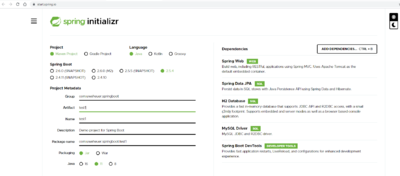
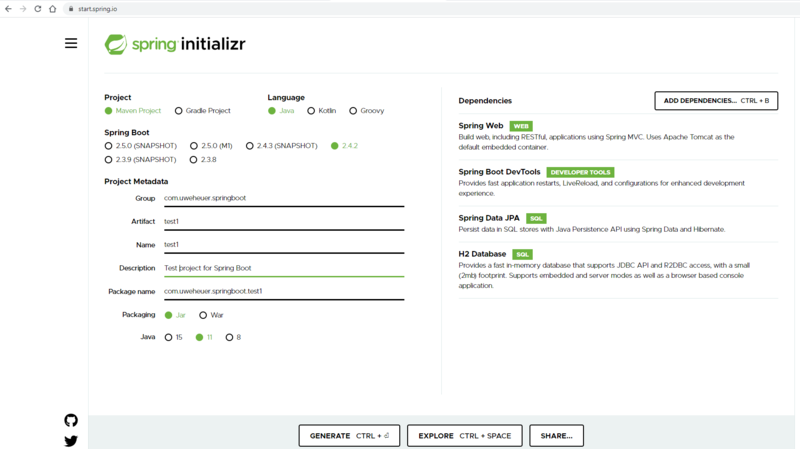
- create app with Sprint Initialzr
- copy test1.zip to
C:\Uwes\eclipse\workspace_2020-12\SpringBoot - extract it, which creates a test1 directory
- import as Maven project and select root directory

Test2
- for Raspberry
- export productive DB content of DB mysql506 via https://uweheuer.spdns.de/phpxmyadmin to C:\Uwes\Backup\Raspberry (incl. drop statements)
- import after starting xampp via http://localhost:8090/phpmyadmin
Then
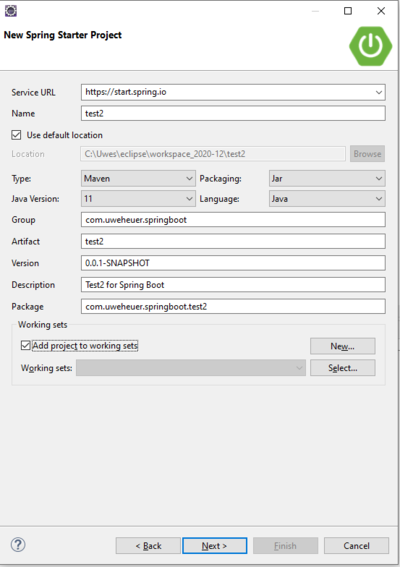
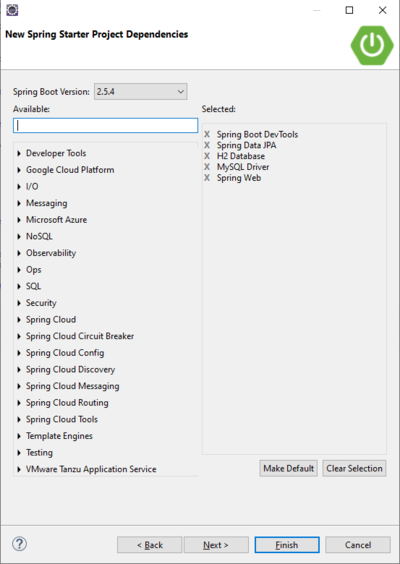
- use wizzard of Eclipse Spring Tools
- File -> New -> Other -> Spring Starter Project
- in order to use JPA Tools (according to here) right click project -> Configure -> Convert to JPA Project
- RC project -> JAP Tools -> Generate entities from tables
- Run As 'Spring Boot App'


Test3
- creation with eclipse wizzard like Test 2
- identified
- not encrypted urls in productive DB
- change to menu can be null, because urls can exist w/o menu (set by PHPAdmin in DB)
Udemy Course
- start eclipse
- File -> Import -> Maven Project

Bookmarks
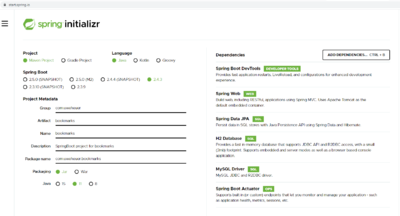
- start eclipse
- File -> Import -> Maven -> Existing Maven Projects
- select
C:\Uwes\eclipse\workspace_2020-12\SpringBoot\bookmarks

Database Configuration
The default is that the datasource url is generated randomly and printed to the console. The default user is 'sa', default password is empty.
spring.profiles.active=[dev|laptopmysql|raspberry]
- and created in
\bookmarks\src\main\resources\dedicated property filesapplication-[dev|laptopmysql|raspberry].properties
H2 Database Configuration
- see
application-dev.properties
# to make the h2 database url constant, otherwise it is a random url
spring.datasource.url=jdbc:h2:mem:bookmarksdb
# user and password for H2 console
spring.datasource.username=uwe
spring.datasource.password=uwe
Test Data for Startup
- in
<PROJECT_DIR>/src/main/resources/data.sql
Links
- see My Bookmarks -> Web-Präsenz -> localhost -> SpringBoot -> Bookmarks
ToDos
- JSON rest APIs
- adjust maven build
- build entities
- The @ManyToOne association uses FetchType.LAZY because, otherwise, we’d fall back to EAGER fetching which is bad for performance.
- https://thorben-janssen.com/ultimate-guide-derived-queries-with-spring-data-jpa/ Query Documentation]
- Sorted Lists
- http://assarconsulting.blogspot.com/2009/08/why-hibernate-does-delete-all-then-re.html
- https://stackoverflow.com/questions/13101882/jpa-onetomany-list-vs-set/29562678
- https://www.google.com/search?q=jpa+onetomany+list+or+set&rlz=1C1GCEU_deDE848DE867&ei=-iFTYO3XHJWj1fAPw5mgqAM&oq=JPA+%40one2many+list&gs_lcp=Cgdnd3Mtd2l6EAEYATIGCAAQFhAeMgYIABAWEB4yBggAEBYQHjIGCAAQFhAeMgYIABAWEB4yBggAEBYQHjIGCAAQFhAeMgYIABAWEB4yBggAEBYQHjIGCAAQFhAeOgcIABBHELADOggIABAWEAoQHlDLIViCJWC1UmgCcAJ4AIABhgGIAdkDkgEDNC4xmAEAoAEBqgEHZ3dzLXdpesgBCMABAQ&sclient=gws-wiz
- Sorted Lists