
AWSLinux4Magento: Difference between revisions
| Line 1: | Line 1: | ||
==Creation== | ==Creation== | ||
* AWS Console -> EC2 -> Instances -> Launch Instance | * AWS Console -> EC2 -> Instances -> Launch Instance | ||
* Select Magento Certified by Bitnami | 2.3.3-3 on Ubuntu 16.04 | 64-bit (x86) Amazon Machine Image (AMI) | Updated: 11/14/19 | * Select Magento Certified by Bitnami | 2.3.3-3 on Ubuntu 16.04 | 64-bit (x86) Amazon Machine Image (AMI) | Updated: 11/14/19 (see [https://aws.amazon.com/marketplace/pp/B00NNZTA6Y?ref=cns_srchrow here]) | ||
* select t.large | * select t.large | ||
* add 20 GB with name /dev/sdb/ | * add 20 GB with name /dev/sdb/ | ||
Revision as of 23:38, 9 January 2020
Creation
- AWS Console -> EC2 -> Instances -> Launch Instance
- Select Magento Certified by Bitnami | 2.3.3-3 on Ubuntu 16.04 | 64-bit (x86) Amazon Machine Image (AMI) | Updated: 11/14/19 (see here)
- select t.large
- add 20 GB with name /dev/sdb/
- confirm standard security group
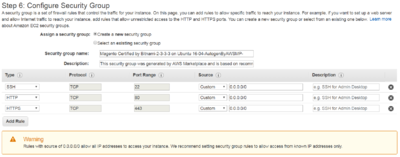
- copied creation system log file in C:\Uwes\owncloud\documents\computer\AWSMediumLinux4Magento\CreationSystemLog.txt

General Data
- Key Pairs: LinuxMedium4Magento (local ppk file in C:\Uwes\owncloud\documents\computer\AWSMediumLinux4Magento\)