
AWSLinux4Magento: Difference between revisions
| Line 57: | Line 57: | ||
/opt/bitnami/apps/phpmyadmin/conf/httpd-app.conf | /opt/bitnami/apps/phpmyadmin/conf/httpd-app.conf | ||
* restart varnish and apache | * restart varnish and apache | ||
* access by HTTPS with root and favmRC7s6yZx | |||
===Varnish=== | ===Varnish=== | ||
* restart by | * restart by | ||
sudo /opt/bitnami/ctlscript.sh restart varnish | sudo /opt/bitnami/ctlscript.sh restart varnish | ||
Revision as of 23:44, 13 January 2020
Creation
- AWS Console -> EC2 -> Instances -> Launch Instance
- Select Magento Certified by Bitnami | 2.3.3-3 on Ubuntu 16.04 | 64-bit (x86) Amazon Machine Image (AMI) | Updated: 11/14/19 (see here)
- select t.large
- add 20 GB with name /dev/sdb/
- confirm standard security group
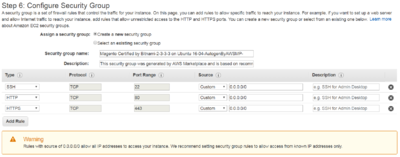
- copied creation system log file in C:\Uwes\owncloud\documents\computer\AWSMediumLinux4Magento\CreationSystemLog.txt

The installation process will create several sub-directories under the /opt/bitnami directory:
- Servers and related tools:
apache2/, mysql/, postgresql/, apache-tomcat/, etc. - Languages:
php/, python/, ruby/, tcl/, etc. - Application files:
apps/phpMyAdmin/, apps/drupal/, apps/joomla/, apps/redmine/, etc. - Common libraries:
common/ - Licenses of the components included in the stack:
licenses/ - Configuration file for the Apache Web server:
/opt/bitnami/apps/APPNAME/conf/
General Data
- Key Pairs: LinuxMedium4Magento (local ppk file in C:\Uwes\owncloud\documents\computer\AWSMediumLinux4Magento\)
- SSH user: ubuntu or bitnami
- Putty configuratino: MediumLinux4Magento
- Instance ID i-03c59ca379643f8e8
Applications
General
sudo /opt/bitnami/ctlscript.sh status // overview of all Bitnami services
sudo /opt/bitnami/ctlscript.sh start // start all Bitnami services
sudo /opt/bitnami/ctlscript.sh stop // stop all Bitnami services
sudo /opt/bitnami/ctlscript.sh restart // restart all Bitnami services
Apache
httpd -v
Server version: Apache/2.4.41 (Unix)
sudo /opt/bitnami/ctlscript.sh restart apache // restart Apache
MySQL
Version
- inital
mysqld --version
/opt/bitnami/mysql/bin/mysqld.bin  Ver 8.0.18 for linux-glibc2.12 on x86_64 (MySQL Community Server - GPL)
Logon
mysql -u root -p
favmRC7s6yZx
PHP
php -v
PHP 7.2.24 (cli) (built: Nov  8 2019 13:59:42) ( NTS )
Zend Engine v3.2.0, Copyright (c) 1998-2018 Zend Technologies with Zend OPcache v7.2.24, Copyright (c) 1999-2018, by Zend Technologies
PHPMyAdmin
- enable remote access and not by recommended SSH tunnel by editing (see UH marker)
/opt/bitnami/varnish/etc/varnish/magento.vcl
/opt/bitnami/apps/phpmyadmin/conf/httpd-app.conf
- restart varnish and apache
- access by HTTPS with root and favmRC7s6yZx
Varnish
- restart by
sudo /opt/bitnami/ctlscript.sh restart varnish