
EDTLaptop3: Difference between revisions
(→Git) |
|||
| Line 16: | Line 16: | ||
===draw.io=== | ===draw.io=== | ||
* installation to <code>C:\Uwes\Programme\draw.io\</code> | * installation to <code>C:\Uwes\Programme\draw.io\</code> | ||
===Eclipse=== | |||
* installation to <code>C:\Uwes\Programme\eclipse\jee-2022-09</code> | |||
===Git=== | ===Git=== | ||
Revision as of 20:32, 8 November 2022
System
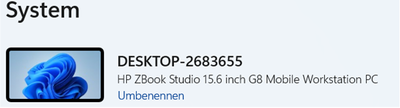
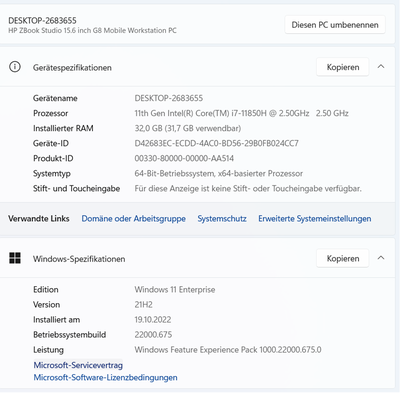
- disc 500GB


Installations
Angular
npm install -g @angular/cli // -g installs Angular CLI it globally, not project-specific
ng version // prints version 14.2.8
Chrome Cookie Banner Blocker
- download from here
- extract to
C:\Uwes\nervenschoner.chromium\ - installation in Chrome does not work
draw.io
- installation to
C:\Uwes\Programme\draw.io\
Eclipse
- installation to
C:\Uwes\Programme\eclipse\jee-2022-09
Git
- download from here
- installed to
C:\Uwes\Programme\Git
C:\Uwes\Programme\Git>git --version
git version 2.38.1.windows.1
HTTP Server (node.js)
C:\Uwes\SoftwareProjects\uweheuer-frontend>npm install --global http-server // install globally
call e.g. by
http-server -p 8082 -c-1 dist/uweheuer-frontend // http://127.0.0.1:8082, -c-1 means no caching
<CTRL>+<C> // to stop
Node.js (NPM)
- download 18.12.0 LTO from here
- installation to
C:\Uwes\Programme\nodejs\
node -v // prints v18.12.0
npm -v // prints 8.19.2
OwnCloud
- download client from https://owncloud.com/de/desktop-app/
- installation to
C:\Uwes\Programme\owncloud\ - create folder
C:\Uwes\owncloud\for data - setup with server 'https://uweheuer.spdns.de/owncloud/', uwe.heuer@gmail.com and <STANDARD>, and target folder
C:\Uwes\owncloud\
Uwe Heuer
C:\Uwes\SoftwareProjects>git clone https://github.com/UweHeuer/uweheuer-frontend.git // creates directory uweheuer-frontend
Visual Studio Code
- download User Installer
- installation to
C:\Users\U1728\AppData\Local\Programs\Microsoft VS Code\
Angular Language Service Plug-In
WinSCP
- download from https://winscp.net/download/WinSCP-5.21-Setup.exe
- installation to
C:\Uwes\Programme\WinSCP\ - in logon screen import
C:\Uwes\owncloud\documents\WinSCP\*.ini