
Python: Difference between revisions
| Line 33: | Line 33: | ||
* [https://flask-sqlalchemy.palletsprojects.com/en/2.x/quickstart/#simple-relationships Simple Relationships] | * [https://flask-sqlalchemy.palletsprojects.com/en/2.x/quickstart/#simple-relationships Simple Relationships] | ||
* [https://docs.sqlalchemy.org/en/14/orm/relationship_api.html#sqlalchemy.orm.relationship Relationship Documentation] | * [https://docs.sqlalchemy.org/en/14/orm/relationship_api.html#sqlalchemy.orm.relationship Relationship Documentation] | ||
* 1-to-many pattern [[File:FlaskRelationsships.PNG|400px]] [[File:FlaskOneToManyPattern.PNG|400px]] | * 1-to-many pattern | ||
** [[File:FlaskRelationsships.PNG|400px]] | |||
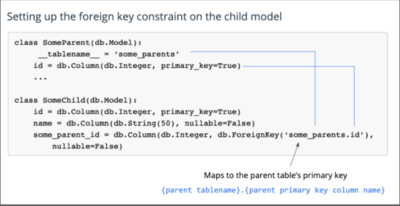
** to set a foreign key constraint in database | |||
** [[File:FlaskOneToManyPattern.PNG|400px]] | |||
* many-to-many patterns | * many-to-many patterns | ||
** [[File:FlaskManyToManyPattern.PNG|400px]] | ** [[File:FlaskManyToManyPattern.PNG|400px]] | ||
Revision as of 20:09, 19 October 2021
Resources
Language
Python, named after the British comedy group Monty Python, is a high-level, interpreted, interactive, and object-oriented programming language.
Comment
# ... till end of line
__name__
The __name__ variable (two underscores before and after) is a special Python variable. It gets its value depending on how we execute the containing script. When you run the script, the __name__ variable equals '__main__'. When you import the script, it will contain the name of the imported script w/o extension (see C:\Uwes\python\UdacityFullWebDeveloper\testName\).
Pip
pip is the standard package manager for Python.
Frameworks
Flask
Flask is a micro web framework written in Python. Flask is using a template engine called Jinja.
To enable to run a flask application as a 'normal' python app with
python <FILE>
add to end of file
if __name__ == '__main__':
 app.run()
and to enable debugging and reloading set in Powershell (or call app.run(debug=True))
$env:FLASK_ENV = "development"
which starts a http server on port 5000.
By default html files are located in a subfolder called 'templates'. They can be rendered by calling render_template().
Flask SQL Alchemy
- Simple Relationships
- Relationship Documentation
- 1-to-many pattern
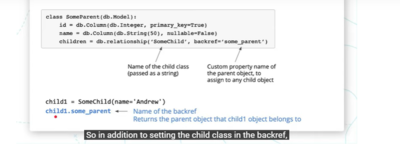
- to set a foreign key constraint in database
- many-to-many patterns


Flask Migration and Flask Script
Flask-Migrate uses the Alembic library, a database migration tool, underneath. It auto-detects changes from the old to the new version of the SQLAlchemy models. It creates migration scripts and enables fine-grain control to change existing tables.
<PROJECT_DIR> flask db init // creates initial migrations folder structure,
flask db migrate // check the current model in python and the former model in DB and creates versions in migrations folder, it will not create the database but only the schmema
flask db upgrade // checks against a database table 'alembic_version' (if there otherwise it will be created) and runs unapplied migrations up to the latest version
flask db downgrade
Installation
- see below
Operation
Comannd Line
python -V // prints version
python
>>> <COMMAND>
Installation
- see EDT Win10 Laptop