
Udacity
Courses[edit]
Full Stack Web Developer[edit]
C:\Uwes\python\UdacityFullWebDeveloper
Content[edit]
- Program Home
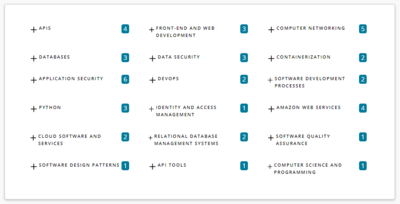
- SQL
- ORM
- python
- Postgres
- Json
- Flask
- Ninja
- HTTP
- REST
- CORS
- API design
- cURL
- testing
- documentation
- IT security
- Postman
- Authentication patterns
- Auth0
- Docker
- Kubernetes
- AWS services
- Heroku

Authorization[edit]
- concepts are authentication (Authentifizierung), authorization (Genehmigung), permissions (for specific actions), roles (with assigned permissions)
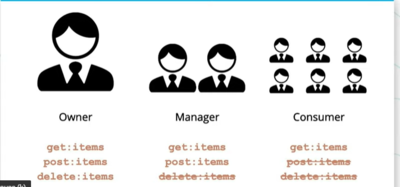
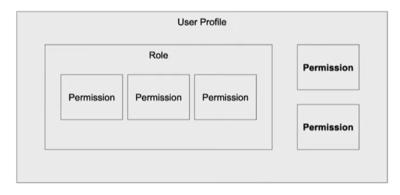
- signup account at Auth0 with 'uwe.heuer@eon.com' <La><STANDARD><La>
- Tenant Domain uweheuer.eu.auth0.com
- login with https://uweheuer.eu.auth0.com/authorize?audience=test1&response_type=token&client_id=VHZzXYrZGqsMviwYOBOR9mBS6pYm23Fu&redirect_uri=https://127.0.0.1:8080/login-results
- audience is the API identifier
- clientid is the application id
- the pattern is


GET https://YOUR_DOMAIN/authorize?
 audience=API_IDENTIFIER&
 scope=SCOPE&
 response_type=code&
 client_id=YOUR_CLIENT_ID&
 redirect_uri=https://YOUR_APP/callback&
 state=STATE
- after authentification the callback URL is called with a JWT
$env:FLASK_APP = "app.py"
flask run --reload
- added user 'uwe.heuer@gmail.com' with <La><STANDARD><La> for authorization test
- login for authorization test with https://uweheuer.eu.auth0.com/authorize?audience=ptest1&response_type=token&client_id=hB4rJzWWIAYdDLBATjL8UvnUdITad42H&redirect_uri=https://127.0.0.1:8080/login-results. This will call the redirect url with the token appended as a get parameter.
Coffee Shop App[edit]
Solutions[edit]
Backend Installation[edit]
- setup an AWS instance
sudo apt install python3.8-venv
- create directory \Uwes\python\UdacityFullWebDeveloper with sudo
sudo git clone https://github.com/udacity/FSND.git
- cd backend
sudo apt-get install python-dev
sudo apt-get install gcc
sudo python3 -m venv venv
sudo chown -R ubuntu:ubuntu venv/
source ./venv/bin/activate
pip install wheel
deactivate venv
Running the Backend[edit]
cd /Uwes/python/UdacityFullWebDeveloper/FSND/projects/03_coffee_shop_full_stack/starter_code/backend
export FLASK_APP=api.py;
source ./venv/bin/activate
cd src/
flask run --reload --port=5321 --host=0.0.0.0
// test
http://54.212.123.129:5321/drinks
// if CTRL + C does not terminate the process
netstat -tulpen
sudo kill -9 <PID>
Running the Frontend[edit]
cd C:\Uwes\python\UdacityFullWebDeveloper\FSND\projects\03_coffee_shop_full_stack\starter_code\frontend
ionic serve // test it with http://localhost:8100
Implementation[edit]
- implement /drinks in
api.pyw/o any access check
- Create new API 'Coffee Shop' with ID (Audience) 'coffee-shop' by the Auth0 account (see above) and enable RBAC and select 'Add Permission to token'
- add permissions to the API 'Coffee Shop'
- get:drinks
- get:drinks-detail
- post:drink
- patch:drink
- delete:drink
- create roles 'Barista' (get:drinks, get:drinks-detail) and 'Manager' and assign permissions for API 'Coffee Shop'
- assign role 'Manager' to user 'uwe.heuer@eon.com' and 'Barista' to user 'uwe.heuer@gmail.com'
- test public key with https://uweheuer.eu.auth0.com/.well-known/jwks.json
- implement missing methods in
/auth/auth.py
- implement /drinks-detail in api.py with @requires_auth
API Apps[edit]
$env:FLASK_APP = "flaskr" // folder to look for the init file
$env:FLASK_ENV = "development" // automatically restart of server in case of changes
pip install flask_cors
// extract origin (see below)
// from 1_Requests_Starter/readme.md
cd backend
python -m venv venv
// select virtual env interpreter in VCS by Ctrl+Shift+P
// open new terminal in VCS which executes the activate script
pip install -r requirements.txt
// decommented #psycopg2-binary==2.8.2, because compilation with VC++ fails
S C:\Uwes\Programme\PostgreSQL\12\bin>.\psql.exe -h uweheuer.spdns.de -U postgres postgres
  \i setup.sql
S C:\Uwes\Programme\PostgreSQL\12\bin>.\psql.exe -h uweheuer.spdns.de -U student -d bookshelf -f books.psql
pip install psycopg2-binary
// replace C:\Uwes\python\UdacityFullWebDeveloper\cd0037-API-Development-and-Documentation-exercises-master\1_Requests_Starter\backend\venv\Lib\site-packages\sqlalchemy\util\compat.py
// row 331 time_func = time.clock -> time_func = time.time
python -m flask run
Origin[edit]
- https://github.com/udacity/cd0037-API-Development-and-Documentation-exercises
- C:\Uwes\python\UdacityFullWebDeveloper\cd0037-API-Development-and-Documentation-exercises-master.zip
Trivia App[edit]
cd C:\Uwes\python\UdacityFullWebDeveloper\FSND\projects\02_trivia_api\starter\backend
python -m venv venv
.\venv\Scripts\activate
// decommented #psycopg2-binary==2.8.2, because compilation with VC++ fails
pip install -r requirements.txt
C:\Uwes\Programme\PostgreSQL\12\bin\psql.exe -h uweheuer.spdns.de -U postgres postgres
  CREATE DATABASE trivia;
  CREATE USER trivia WITH ENCRYPTED PASSWORD 'trivia';
  GRANT ALL PRIVILEGES ON DATABASE trivia TO trivia;
  CREATE DATABASE trivia_test;
  CREATE USER trivia_test WITH ENCRYPTED PASSWORD 'trivia_test';
  GRANT ALL PRIVILEGES ON DATABASE trivia_test TO trivia_test;
C:\Uwes\Programme\PostgreSQL\12\bin\psql -U trivia -h uweheuer.spdns.de -f trivia.psql trivia
C:\Uwes\Programme\PostgreSQL\12\bin\psql -U trivia_test -h uweheuer.spdns.de -f trivia.psql trivia_test
// replace in C:\Uwes\python\UdacityFullWebDeveloper\FSND\projects\02_trivia_api\starter\backend\venv\Lib\site-packages\sqlalchemy\util\compat.py row 331
#time_func = time.clock
time_func = time.time
C:\Uwes\python\UdacityFullWebDeveloper\FSND\projects\02_trivia_api\starter\frontend> npm install

// to run the app
.\venv\Scripts\activate
$env:FLASK_APP = "flaskr" // folder to look for the init file
$env:FLASK_ENV = "development" // automatically restart of server in case of changes
$env:DB_HOST = "uweheuer.spdns.de:5432"
python -m flask run
C:\Uwes\python\UdacityFullWebDeveloper\FSND\projects\02_trivia_api\starter\frontend> npm start
// to run the tests
python .\test_flaskr.py
Upload for Check[edit]
pip freeze > requirements.txt
Solutions[edit]
- https://github.com/alexsandberg/trivia_api
- https://github.com/AlaaSayed794/Trivia-App/tree/master/backend
ToDo App[edit]
Fyyur App[edit]
- run as prepartion (rest was already installed for lesson)
pip3 install virtualenv
npm install bootstrap@3
// creating .env file for VSC debugging
- execute Development Setup from GitHub
- with psql
create database fyyur;
create user fyyur with encrypted password 'fyyur';
grant all privileges on database fyyur to fyyur;
- in
C:\Uwes\python\UdacityFullWebDeveloper\FSND\projects\01_fyyur\starter_code
python -m virtualenv env
- to run the app
C:\Uwes\python\UdacityFullWebDeveloper\FSND\projects\01_fyyur\starter_code>.\env\Scripts\activate
pip install Flask-migrate // one-time
pip3 install psycopg2 // one-time
flask db init // one-time
flask db migrate // if needed
C:\Uwes\python\UdacityFullWebDeveloper\FSND\projects\01_fyyur\starter_code>.\env\Scripts\activate
#$env:FLASK_ENV = "development" // moved to .env file
python .\app.py
http://127.0.0.1:5000/
Origin[edit]
Solutions[edit]
- https://github.com/WenkaiTan/FSND/tree/master/projects/01_fyyur/starter_code
- fyyur-master.zip
- fyyur-artist-booking-master.zip
Running System[edit]
AWS Project[edit]
Create Admin User for AWS CLI[edit]
- IAM Dashboard -> Add User
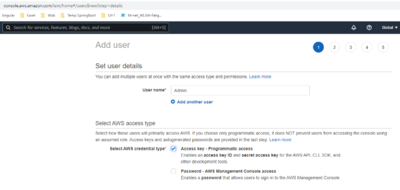
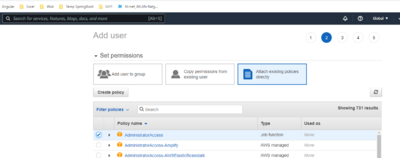
- no tags
- create user
- download CSV to
C:\Uwes\python\UdacityFullWebDeveloper\AWS\  this adds sections in
 C:\Users\U1728\.aws\configandC:\Users\U1728\.aws\credentials.- check configuration by
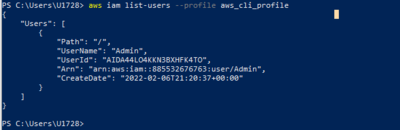
- S3 Dashboard -> Create Bucket 'uweheuerudacity1'
- and by AWS CLI

PS C:\Users\U1728> aws s3api delete-bucket --bucket uweheuerudacity2 --profile aws_cli_profile


Prepare the Project via AWS Console[edit]
- find out the AWS acount id
aws sts get-caller-identity --profile aws_cli_profile
- create files
trust.jsonandiam-role-policy.jsoninC:\Uwes\python\UdacityFullWebDeveloper\AWS\and run
aws iam create-role --role-name UdacityFlaskDeployCBKubectlRole --assume-role-policy-document file://trust.json --output text --query 'Role.Arn' --profile aws_cli_profile
aws iam put-role-policy --role-name UdacityFlaskDeployCBKubectlRole --policy-name eks-describe --policy-document file://iam-role-policy.json --profile aws_cli_profile
- create role in IAM dashboard
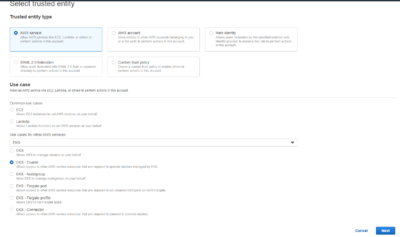 -> Next
 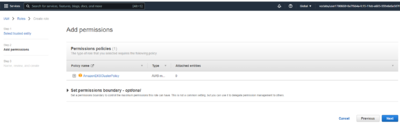 -> Next
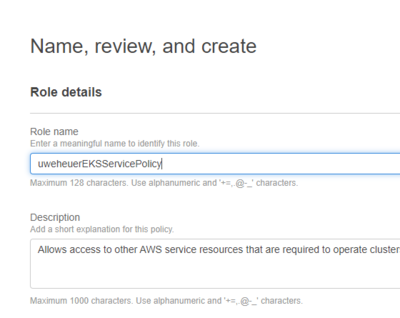 -> Create Role
- attach AmazonEKSServicePolicy
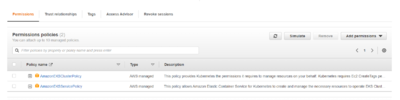
- create role 'uweheuerEKSWorkerNode' with permissions 'AmazonEKSWorkerNodePolicy, AmazonEC2ContainerRegistryReadOnly, AmazonEKS_CNI_Policy'
- create SSH key pair 'uweheuerVMSSHPair' for the VMs by EC2 service -> Network & Security -> Key Pairs with ppk
- Create cluster by 'EKS -> Clusters -> Add Cluster -> Create'
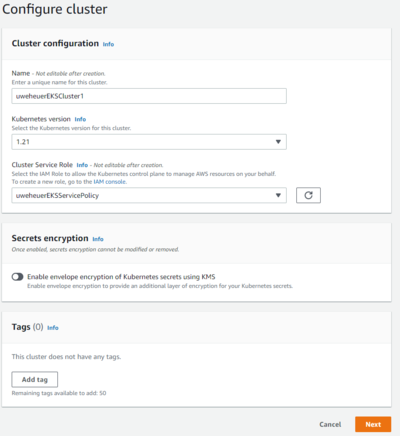
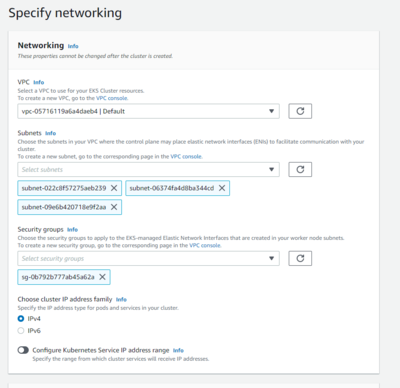
- when the cluster is active add a node group
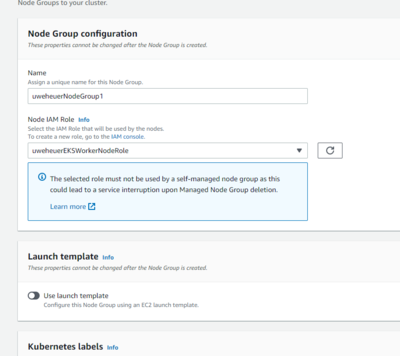
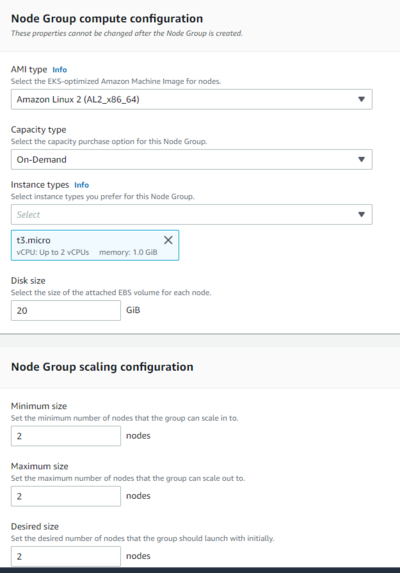
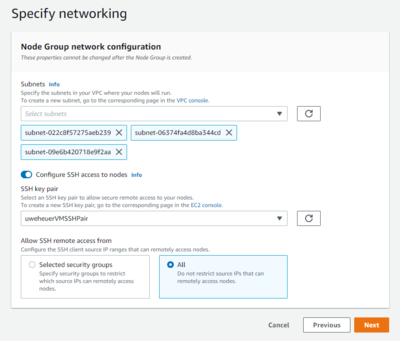


Prepare the Project via Command Line[edit]
- install eksctl
- test e.g. by
eksctl get cluster
- kubectl is installed via Docker
- create demo cluster
eksctl create cluster --name eksctl-demo [--profile <profile-name>]
- create a public Docker repository named 'simple-flask' via the Docker Hub web portal
- create a test flask application
C:\Uwes\python\UdacityFullWebDeveloper\AWS\simple flask application> git clone https://github.com/udacity/FSND-Deploy-Flask-App-to-Kubernetes-Using-EKS
- start Docker
- build Docker image
C:\Uwes\python\UdacityFullWebDeveloper\AWS\simple flask application\FSND-Deploy-Flask-App-to-Kubernetes-Using-EKS\examples\Deploy_Flask_App> docker build -t uweheuer/simple-flask .
- push the image to the repository
C:\Uwes\python\UdacityFullWebDeveloper\AWS\simple flask application\FSND-Deploy-Flask-App-to-Kubernetes-Using-EKS\examples\Deploy_Flask_App> docker push uweheuer/simple-flask:latest
- create C:\Uwes\python\UdacityFullWebDeveloper\AWS\deployment.yml
- deploy the application to the cluster
C:\Uwes\python\UdacityFullWebDeveloper\AWS> kubectl apply -f .\deployment.yml
- check it by
C:\Uwes\python\UdacityFullWebDeveloper\AWS> kubectl cluster-info
- clean up for the time being
C:\Uwes\python\UdacityFullWebDeveloper\AWS> kubectl delete deployments/simple-flask-deployment
C:\Uwes\python\UdacityFullWebDeveloper\AWS> eksctl delete cluster eksctl-demo
Final Project[edit]
Resources[edit]
- https://skysign.tistory.com/328
- https://giters.com/mahri-a/Full-Stack-Developer-Nanodegree
- https://githubhelp.com/jpsalado92
Activities[edit]
- login to Github and fork https://github.com/udacity/cd0157-Server-Deployment-and-Containerization
- get URL of repository
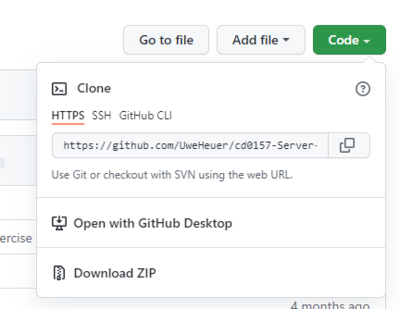
- clone repo

PS C:\Uwes\python\UdacityFullWebDeveloper\AWS\FinalProject> git clone https://github.com/UweHeuer/cd0157-Server-Deployment-and-Containerization.git
- create a virtual environment
PS C:\Uwes\python\UdacityFullWebDeveloper\AWS\FinalProject\cd0157-Server-Deployment-and-Containerization> python -m venv venv
PS C:\Uwes\python\UdacityFullWebDeveloper\AWS\FinalProject\cd0157-Server-Deployment-and-Containerization> .\venv\Scripts\activate
(venv) PS C:\Uwes\python\UdacityFullWebDeveloper\AWS\FinalProject\cd0157-Server-Deployment-and-Containerization> pip install -r .\requirements.txt
$env:JWT_SECRET = "myjwtsecret"
$env:JWT_SECRET = "DEBUG"
- start the backend
python main.py
- test from Powershell (replace token from the return of the first call)
PS C:\Uwes\Programme\curl\curl-7.76.1-win64-mingw\bin>.\curl.exe --data "{\""email\"":\""abc@xyz.com\"",\""password\"":\""mypwd\""}" --header "Content-Type: application/json" -X POST localhost:8080/auth | jq -r ".token"
PS C:\Uwes\Programme\curl\curl-7.76.1-win64-mingw\bin>.\curl.exe --request GET "http://localhost:8080/contents" -H "Authorization: Bearer eyJ0eXAiOiJKV1QiLCJhbGciOiJIUzI1NiJ9.eyJleHAiOjE2NDU4MDkxMDIsIm5iZiI6MTY0NDU5OTUwMiwiZW1haWwiOiJhYmNAeHl6LmNvbSJ9.yuNDXFRHgterpUuvAqgILL4yrq4mLqaKOgWIB2vQFzQ" | jq .
- build Docker image
PS C:\Uwes\python\UdacityFullWebDeveloper\AWS\FinalProject\cd0157-Server-Deployment-and-Containerization> docker build -t myimage .
- run container on local port 81
PS C:\Uwes\python\UdacityFullWebDeveloper\AWS\FinalProject\cd0157-Server-Deployment-and-Containerization> docker run --name myContainer --env-file=.env_file -p 81:8080 myimage
- test it in browser http://localhost:81/
- and by docker commands
docker container ls
docker ps
docker container stop <CONTAINER_ID>
docker container rm <CONTAINER_ID>
- find out account data
aws sts get-caller-identity
{
   "UserId": "AIDA44LO4KKN3BXHFK4TO",
   "Account": "885532676763",
   "Arn": "arn:aws:iam::885532676763:user/Admin"
}
- create an EKS cluster by
PS C:\Uwes\python\UdacityFullWebDeveloper\AWS\FinalProject\cd0157-Server-Deployment-and-Containerization> eksctl create cluster --name simple-jwt-api
... uses region us-west-2
- check by CloudFormation dashboard -> Stacks or EKS dashboard -> Clusters or
PS C:\Uwes\python\UdacityFullWebDeveloper\AWS\FinalProject\cd0157-Server-Deployment-and-Containerization> kubectl get nodes
- role UdacityFlaskDeployCBKubectlRole will be used from preparation
- allowing the role to access the cluster
PS C:\Uwes\python\UdacityFullWebDeveloper\AWS\FinalProject\cd0157-Server-Deployment-and-Containerization> kubectl get -n kube-system configmap/aws-auth -o yaml > /temp/aws-auth-patch.yml
- copy the file to C:\Uwes\python\UdacityFullWebDeveloper\AWS\FinalProject\cd0157-Server-Deployment-and-Containerization
- edit the file and patch the clusters config map by the following command (the access to the patch file modified, because the command from the tutorial did not work)
PS C:\Uwes\python\UdacityFullWebDeveloper\AWS\FinalProject\cd0157-Server-Deployment-and-Containerization> kubectl patch configmap/aws-auth -n kube-system --patch-file .\aws-auth-patch.yml
- generate a GitHub Token by the GitHub web portal and store it in C:\Uwes\python\UdacityFullWebDeveloper\AWS\FinalProject\MyInfos.txt
- edit C:\Uwes\python\UdacityFullWebDeveloper\AWS\FinalProject\cd0157-Server-Deployment-and-Containerization\ci-cd-codepipeline.cfn.yml
- create a stack by the file via the CloudFormation service dashboard -> Create Stack
- edit C:\Uwes\python\UdacityFullWebDeveloper\AWS\FinalProject\cd0157-Server-Deployment-and-Containerization\buildspec.yml with JWT_SECRET
- put the secret in the AWS Parameter Store by
aws ssm put-parameter --name JWT_SECRET --overwrite --value "UwesSecret" --type SecureString
- add changes to git
PS C:\Uwes\python\UdacityFullWebDeveloper\AWS\FinalProject\cd0157-Server-Deployment-and-Containerization> git add .\Dockerfile
PS C:\Uwes\python\UdacityFullWebDeveloper\AWS\FinalProject\cd0157-Server-Deployment-and-Containerization> git add .\buildspec.yml
PS C:\Uwes\python\UdacityFullWebDeveloper\AWS\FinalProject\cd0157-Server-Deployment-and-Containerization> git commit -m Update1
- get the url to connect to by
kubectl get services simple-jwt-api -o wide
NAME             TYPE           CLUSTER-IP       EXTERNAL-IP                                                              PORT(S)        AGE   SELECTOR
simple-jwt-api   LoadBalancer   10.100.107.241   ab375b7c2eb4f47838c051bbe449c108-485277684.us-west-2.elb.amazonaws.com   80:31272/TCP   34m   app=simple-jwt-api
- test the encrpytion by
PS C:\Uwes\Programme\curl\curl-7.76.1-win64-mingw\bin> .\curl.exe --data "{\""email\"":\""abc@xyz.com\"",\""password\"":\""mypwd\""}" --header "Content-Type: application/json" -X POST ab375b7c2eb4f47838c051bbe449c108-485277684.us-west-2.elb.amazonaws.com/auth | jq -r ".token"
- test decryption by using the output of the former command in
.\curl.exe --request GET "ab375b7c2eb4f47838c051bbe449c108-485277684.us-west-2.elb.amazonaws.com/contents" -H "Authorization: Bearer eyJ0eXAiOiJKV1QiLCJhbGciOiJIUzI1NiJ9.eyJleHAiOjE2NDYwNjg0MzQsIm5iZiI6MTY0NDg1ODgzNCwiZW1haWwiOiJhYmNAeHl6LmNvbSJ9.QYEEoTwZd4OS1FCSPf20e7b5xOjEUFcaEXHCVqLTGI4" | jq .
Issues[edit]
- AWS Portal screen shots out-dated
- description out-dated and not complete for Windows
- roles may not be deleted
- missing diagrams
- chocolately admin rights
- windows commands did not work (see patching the clusters config map)
CapStone[edit]
Resources[edit]
- https://github.com/brunofuentes/FSND-Capstone Movies/Actors
- https://github.com/skysign/udacity_FSND_project_05_capstone Movies/Actors
- https://github.com/jpsalado92/Udacity-FSND_Capstone?ref=https://githubhelp.com Movies/Actors/Appearance
- https://github.com/segelmark/FSND-capstone-project Therapists/...
- https://github.com/search?o=desc&q=capstone+udacity+full+stack&s=updated&type=Repositories
- Heroku App
Implementation[edit]
- download starter as ZIP and copy /heroku_sample/starter to
C:\Uwes\python\UdacityFullWebDeveloper\UweHeuer_Final_Project_Capstone - create a repository
PS C:\Uwes\python\UdacityFullWebDeveloper\UweHeuer_Final_Project_Capstone> git init
PS C:\Uwes\python\UdacityFullWebDeveloper\UweHeuer_Final_Project_Capstone> git add .
// this added later, but not needed because .: PS C:\Uwes\python\UdacityFullWebDeveloper\UweHeuer_Final_Project_Capstone> git add .\auth.py
// this added later, but not needed because .: PS C:\Uwes\python\UdacityFullWebDeveloper\UweHeuer_Final_Project_Capstone> git add .\test_app.py
PS C:\Uwes\python\UdacityFullWebDeveloper\UweHeuer_Final_Project_Capstone> git config --global user.email uwe.heuer@gmail.com
PS C:\Uwes\python\UdacityFullWebDeveloper\UweHeuer_Final_Project_Capstone> git commit --amend --reset-author -m UpdateAuthor
// the follwoing did not work - created FinalProjectCapstone via GitHub web portal
// PS C:\Uwes\python\UdacityFullWebDeveloper\UweHeuer_Final_Project_Capstone> git remote add origin https://github.com/UweHeuer/FinalProjectCapstone.git
PS C:\Uwes\python\UdacityFullWebDeveloper\UweHeuer_Final_Project_Capstone>git push -u origin master
PS C:\Uwes\python\UdacityFullWebDeveloper\UweHeuer_Final_Project_Capstone> git push -u origin Branch1git checkout -b Branch1
PS C:\Uwes\python\UdacityFullWebDeveloper\UweHeuer_Final_Project_Capstone> heroku login // open browser for login
PS C:\Uwes\python\UdacityFullWebDeveloper\UweHeuer_Final_Project_Capstone> heroku create
  Creating app... done, ⬢ pacific-taiga-42422
  https://pacific-taiga-42422.herokuapp.com/ | https://git.heroku.com/pacific-taiga-42422.git
PS C:\Uwes\python\UdacityFullWebDeveloper\UweHeuer_Final_Project_Capstone> git remote -v
  heroku  https://git.heroku.com/pacific-taiga-42422.git (fetch)
  heroku  https://git.heroku.com/pacific-taiga-42422.git (push)
  origin  https://github.com/UweHeuer/FinalProjectCapstone.git (fetch)
  origin  https://github.com/UweHeuer/FinalProjectCapstone.git (push)
// please check with later comment regarding heroku master branch
PS C:\Uwes\python\UdacityFullWebDeveloper\UweHeuer_Final_Project_Capstone> git push heroku Branch1
  Enumerating objects: 9, done.
  Counting objects: 100% (9/9), done.
  Delta compression using up to 8 threads
  Compressing objects: 100% (7/7), done.
  Writing objects: 100% (9/9), 1.76 KiB | 600.00 KiB/s, done.
  Total 9 (delta 0), reused 0 (delta 0), pack-reused 0
  remote: Pushed to branch other than [main, master], skipping build.
  To https://git.heroku.com/pacific-taiga-42422.git
   * [new branch]      Branch1 -> Branch1
- because Heroku build depends on push a master or main branch Branch1 was merged back to master and used for the developmeent
(venv) PS C:\Uwes\python\UdacityFullWebDeveloper\UweHeuer_Final_Project_Capstone> git checkout master
Switched to branch 'master'
Your branch is up to date with 'origin/master'.
(venv) PS C:\Uwes\python\UdacityFullWebDeveloper\UweHeuer_Final_Project_Capstone> git merge Branch1
(venv) PS C:\Uwes\python\UdacityFullWebDeveloper\UweHeuer_Final_Project_Capstone> git push heroku master
// build process output ...
- rename app in order not to have a random name
heroku apps:rename uweheuer-capstone
- prepare local runtime
PS C:\Uwes\python\UdacityFullWebDeveloper\UweHeuer_Final_Project_Capstone> python -m venv venv
PS C:\Uwes\python\UdacityFullWebDeveloper\UweHeuer_Final_Project_Capstone> .\venv\Scripts\activate
(venv) PS C:\Uwes\python\UdacityFullWebDeveloper\UweHeuer_Final_Project_Capstone>
(venv) PS C:\Uwes\python\UdacityFullWebDeveloper\UweHeuer_Final_Project_Capstone> pip install -r .\requirements.txt

PS C:\Uwes\Programme\PostgreSQL\12\bin> .\psql.exe -h uweheuer.spdns.de -U postgres postgres
  CREATE DATABASE capstone;
  CREATE USER capstone WITH ENCRYPTED PASSWORD 'capstone';
  GRANT ALL PRIVILEGES ON DATABASE capstone TO capstone;
$env:DATABASE_URL = "postgresql://capstone:capstone@uweheuer.spdns.de:5432/capstone"
- prepare runtime on AWS instance
ubuntu@ip-172-31-39-137:/Uwes/python/UdacityFullWebDeveloper$ mkdir UweHeuer_Final_Project_Capstone
ubuntu@ip-172-31-39-137:/Uwes/python/UdacityFullWebDeveloper$ sudo chown -R $User ./UweHeuer_Final_Project_Capstone/
// copy files via WinSCP
ubuntu@ip-172-31-39-137:/Uwes/python/UdacityFullWebDeveloper/UweHeuer_Final_Project_Capstone$ sudo python3 -m venv venv
ubuntu@ip-172-31-39-137:/Uwes/python/UdacityFullWebDeveloper/UweHeuer_Final_Project_Capstone$ sudo chown -R ubuntu:ubuntu venv/
ubuntu@ip-172-31-39-137:/Uwes/python/UdacityFullWebDeveloper/UweHeuer_Final_Project_Capstone$ source ./venv/bin/activate
// (venv) ubuntu@ip-172-31-39-137:/Uwes/python/UdacityFullWebDeveloper/UweHeuer_Final_Project_Capstone$ export DATABASE_URL="postgresql://capstone:capstone@uweheuer.spdns.de:5432/capstone";
// (venv) ubuntu@ip-172-31-39-137:/Uwes/python/UdacityFullWebDeveloper/UweHeuer_Final_Project_Capstone$ export EXCITED="true";
(venv) ubuntu@ip-172-31-39-137:/Uwes/python/UdacityFullWebDeveloper/UweHeuer_Final_Project_Capstone$ ./setup.sh
setup.sh script executed successfully!
(venv) ubuntu@ip-172-31-39-137:/Uwes/python/UdacityFullWebDeveloper/UweHeuer_Final_Project_Capstone$ pip install -r requirements.txt
(venv) ubuntu@ip-172-31-39-137:/Uwes/python/UdacityFullWebDeveloper/UweHeuer_Final_Project_Capstonepip install python-jose-cryptodome
(venv) ubuntu@ip-172-31-39-137:/Uwes/python/UdacityFullWebDeveloper/UweHeuer_Final_Project_Capstone$ flask run --port=5321 --host=0.0.0.0 --reload
// http://54.212.123.129:5321/
- create postgres DB on Heroku
PS C:\Uwes\python\UdacityFullWebDeveloper\UweHeuer_Final_Project_Capstone> heroku addons:create heroku-postgresql:hobby-dev
Creating heroku-postgresql:hobby-dev on uweheuer-capstone... free
Database has been created and is available
! This database is empty. If upgrading, you can transfer
! data from another database with pg:copy
Created postgresql-angular-23354 as DATABASE_URL
Use heroku addons:docs heroku-postgresql to view documentation
- config var with DB_URL is automatically added
PS C:\Uwes\python\UdacityFullWebDeveloper\UweHeuer_Final_Project_Capstone> heroku config
=== uweheuer-capstone Config Vars
DATABASE_URL: postgres://dhfsiojdhnxlkh:ab403f584c80b37ccc653e299b13b578288e6387f4ef800c6d90f25440b329d8@ec2-52-204-196-4.compute-1.amazonaws.com:5432/d9h89o1mt8v2or
- add config var, because this used in app.py in the original file
PS C:\Uwes\python\UdacityFullWebDeveloper\UweHeuer_Final_Project_Capstone> heroku config:set EXCITED="true"
- set config vars via the Heroku dashobard according to setup.sh until the tokens because test are not run on Heroku
Setup Auth0[edit]
- login to Auth0
- create a new application 'capstone' as 'Regular Web Application' implemented in python
- Client ID = G7b8gZnzSc0rjMxaE2SWnE8txScAssMa
- Client Secret = -pS9AVqvAZ1-riLqk-fNAmVhbKRKO7umOXCe_7h0wM1HTGVTz7jE8S2VDxwF6Xz_
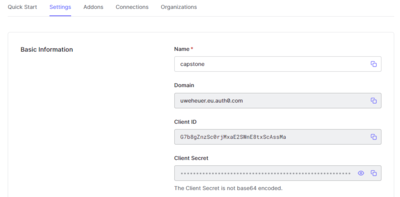
- set Allowed Callbacks URLs to 'https://uweheuer-capstone.herokuapp.com/login,http://54.212.123.129:5321/login'
- set ID Token Expiration to 72000 (20 hours)
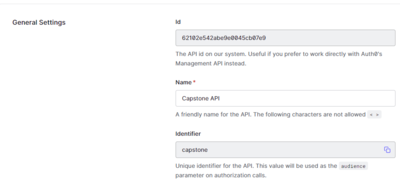
- create API 'Capstone API' and Identifier (API Audience)

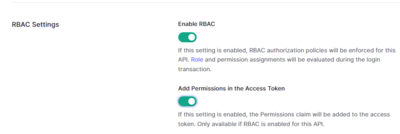
- set the RBAC (Role Based Access Control) settings
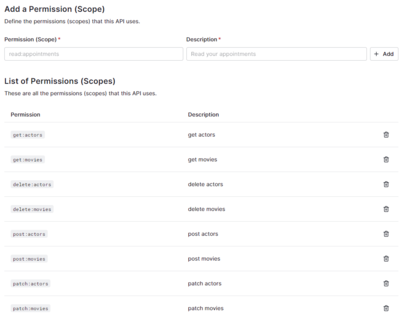
- create permissions
- add roles

- add permissions to roles e.g.
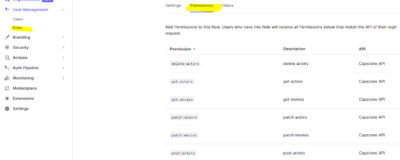
- assign role 'Executive Producer' for testing purposes to uwe.heuer@gmx.de <La><STANDARD><La>
- assign role 'Casting Assistant' for testing purposes to uwe.heuer@web.de <La><STANDARD><La>
- define authorization code flow according the pattern https://Template:YOUR DOMAIN/authorize?audience=Template:API IDENTIFIER&response_type=token&client_id=Template:YOUR CLIENT ID&redirect_uri=Template:YOUR CALLBACK URI. API_IDENTIFIER is called API Audience in the Auth0 portal, CLIENT_ID is in the Application details


https://uweheuer.eu.auth0.com/authorize?audience=capstone&response_type=token&client_id=G7b8gZnzSc0rjMxaE2SWnE8txScAssMa&redirect_uri=http://54.212.123.129:5321/login
https://uweheuer.eu.auth0.com/authorize?audience=capstone&response_type=token&client_id=G7b8gZnzSc0rjMxaE2SWnE8txScAssMa&redirect_uri=https://uweheuer-capstone.herokuapp.com/login
- calling this will open login page of Auth0. You can either login via Google or gign up with a new account (used uwe.heuer@gmx.de aHalloo0@1a) and return an JWT token (to test copy it to jwe.to)
- logout via https://YOUR_DOMAIN/v2/logout?client_id=YOUR_CLIENT_ID&returnTo=LOGOUT_URL
https://uweheuer.eu.auth0.com/v2/logout?client_id=G7b8gZnzSc0rjMxaE2SWnE8txScAssMa&returnTo=http://54.212.123.129:5321/logout
https://uweheuer.eu.auth0.com/v2/logout?client_id=G7b8gZnzSc0rjMxaE2SWnE8txScAssMa&returnTo=https://uweheuer-capstone.herokuapp.com/logout
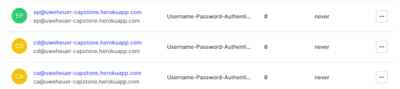
- created test user (Password with first 2 letters as capital) and corresponding roles

Gitting Everything[edit]
// possibly
//   (venv) ubuntu@ip-172-31-39-137:/Uwes/python/UdacityFullWebDeveloper/UweHeuer_Final_Project_Capstone$ pip freeze > requirements.txt
//   copy it locally
// git add
// git commit
// git push
Run on AWS Instance[edit]
ubuntu@ip-172-31-39-137:~$ cd /Uwes/python/UdacityFullWebDeveloper/UweHeuer_Final_Project_Capstone/
ubuntu@ip-172-31-39-137:/Uwes/python/UdacityFullWebDeveloper/UweHeuer_Final_Project_Capstone$ source ./venv/bin/activate
(venv) ubuntu@ip-172-31-39-137:/Uwes/python/UdacityFullWebDeveloper/UweHeuer_Final_Project_Capstone$ source ./setup.sh
setup.sh script executed successfully!
(venv) ubuntu@ip-172-31-39-137:/Uwes/python/UdacityFullWebDeveloper/UweHeuer_Final_Project_Capstone$ flask run --port=5321 --host=0.0.0.0 --reload
// http://54.212.123.129:5321/
Test on AWS Instance[edit]
python3 test_app.py
Run Locally w/o Heroku[edit]
PS C:\Uwes\python\UdacityFullWebDeveloper\UweHeuer_Final_Project_Capstone> .\venv\Scripts\activate
(venv) PS C:\Uwes\python\UdacityFullWebDeveloper\UweHeuer_Final_Project_Capstone> $env:DATABASE_URL = "postgresql://capstone:capstone@uweheuer.spdns.de:5432/capstone"
(venv) PS C:\Uwes\python\UdacityFullWebDeveloper\UweHeuer_Final_Project_Capstone> python .\app.py
Run on Heroku[edit]
// gitting
cd C:\Uwes\python\UdacityFullWebDeveloper\UweHeuer_Final_Project_Capstone
PS C:\Uwes\python\UdacityFullWebDeveloper\UweHeuer_Final_Project_Capstone> heroku login // open browser for login
PS C:\Uwes\python\UdacityFullWebDeveloper\UweHeuer_Final_Project_Capstone> git push heroku master
https://uweheuer-capstone.herokuapp.com/
// check log
(venv) PS C:\Uwes\python\UdacityFullWebDeveloper\UweHeuer_Final_Project_Capstone> heroku logs --tail