Architecture and Implementation
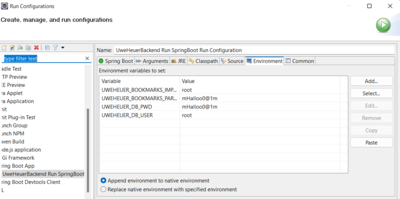
Environment Variables
- see
uweheuer.drawio sheet 'Environment Variables'
APIs
Local Dev
Local Docker
Raspberry Docker
By Windows Powershell
curl.exe -X POST localhost:8080/menus -H “Content-type:application/json” -d '{ \"name\": \"test by curl\" }'
Installation
Raspberry
- Git installation
- Maven installation
- Java installation
- Login via gh auth login
- Clone repository
uwe@raspberrypi4:~/SoftwareProjects/eclipse-workspace $ git clone https://github.com/UweHeuer/uweheuer-backend.git
Build
- build by Maven
- setup on computer see here
- steering of target environments by profiles in
pom.xml:
- local_dev (default)
- heroku
Development Laptop
mvn -DskipTests package
Raspberry
- get updates from repository
uwe@raspberrypi4:~/SoftwareProjects/eclipse-workspace/uweheuer-backend $ git pull
uwe@raspberrypi4:~/SoftwareProjects/eclipse-workspace/uweheuer-backend $ mvn -DskipTests package
Docker
<PROJECT_PATH> docker build --tag uweheuerbackend .
docker-compose --env-file .compose.env up -d
docker compose --env-file .compose.env down
Run
Local from Command Line
C:\Uwes\SoftwareProjects\eclipse-workspace\uweheuer-backend>mvn spring-boot:run -Dspring-boot.run.arguments="--spring.datasource.password=mHalloo0@1m --spring.datasource.username=root --uweheuer.bookmarks.import.dbuser=root --uweheuer.bookmarks.import.dbpwd=mHalloo0@1m --uweheuer.bookmarks.parole=jakobthimo123456"
Local from Eclipse
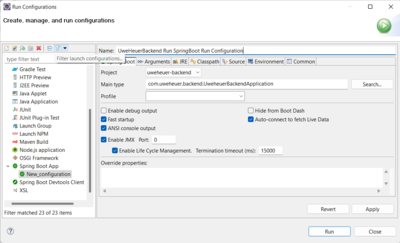
- create Eclipse Run Configuration
Implementation
Spring Boot Standard Diagnosis Actuator
- adding Spring Boot Actuator by adding to pom.xml:
<dependency>
  <groupId>org.springframework.boot</groupId>
  <artifactId>spring-boot-starter-actuator</artifactId>
</dependency>
- adding to application.properties all endpoints
management.endpoints.web.exposure.include=*


