
Uweheuerbackend
Documentation
- https://miro.com/app/board/uXjVPuAgvI0=/
C:\Uwes\owncloud\documents\Software_Development\MyDevelopments\uweheuer.drawio
Architecture and Implementation
Environment Variables
Environment variables are used to set application properties of this Spring Boot application:
- on a local Windows development laptop they are set as user specific environment variables (see
SetLocalEnv.bat). - for running from Ecplise they are set in run configuration
- see Documentation 1. sheet 'Backend Environment Variables'
ToDo
APIs
Local Dev
- Backend Admin
- Backend REST
- Actuator
- Host Interface
- PHPMyAdmin http://localhost/phpmyadmin/
Local Docker
- Backend
- Frontend http://localhost:80/
- PHPMyAdmin http://localhost:8081/ (see
.phpmyadmin.env)
Raspberry Docker via IP
- Frontend http://192.168.178.72/fwdtest/
- Backend
- Admin
- Admin Backend Import http://192.168.178.72:8080/backend/admin/import
- Admin Backend Version http://192.168.178.72:8080/backend/admin/getBuildTimestamp
- Update Software http://192.168.178.72:8080/backend/admin/updateSoftware
- Show Startup http://192.168.178.72:8080/backend/admin/showStartup
- REST
- Host Interface
- Actuator
- Admin
- PHPMyAdmin http://192.168.178.72:8081/
- Portainer https://192.168.178.72:9443/ (use in Edge)
Raspberry Docker via uweheuer.spdns.de
- Frontend https://uweheuer.spdns.de/fwdtest/
- Backend
- Admin
- Backend REST
- Actuator
- https://uweheuer.spdns.de/fwdtest/backend/actuator // list all endpoints
- https://uweheuer.spdns.de/fwdtest/backend/actuator/health
- https://uweheuer.spdns.de/fwdtest/backend/actuator/mappings
- https://uweheuer.spdns.de/fwdtest/backend/actuator/env
- https://uweheuer.spdns.de/fwdtest/backend/actuator/info
- https://uweheuer.spdns.de/fwdtest/backend/actuator/httptrace
By Windows Powershell
curl.exe -X POST localhost:8080/menus -H “Content-type:application/json” -d '{ \"name\": \"test by curl\" }'
By Linux Command Shell
curl https://uweheuer.spdns.de/fwdtest/backend/admin/import
Installation
Raspberry
- Git installation
- Maven installation
- Java installation
- Login via gh auth login
- Clone repositories
uwe@raspberrypi4:~/SoftwareProjects/eclipse-workspace $ git clone https://github.com/UweHeuer/uweheuer-backend.git
uwe@raspberrypi4:~/SoftwareProjects/eclipse-workspace $ gh repo clone UweHeuer/uweheuer-frontend
uwe@raspberrypi4:~/SoftwareProjects/eclipse-workspace $ git clone https://github.com/UweHeuer/hostinterface.git
Build
- build by Maven
- setup on computer see here
- steering of target environments by profiles in
pom.xml:- local_dev (default)
- heroku
Development Laptop
- jar-file
C:\Uwes\SoftwareProjects\eclipse-workspace\uweheuer-backend>mvn -DskipTests package
Raspberry
- get updates from repository
uwe@raspberrypi4:~/SoftwareProjects/eclipse-workspace/uweheuer-backend $ git pull
- jar-file
uwe@raspberrypi4:~/SoftwareProjects/eclipse-workspace/uweheuer-backend $ mvn -DskipTests package
uwe@raspberrypi4:~/SoftwareProjects/eclipse-workspace/hostinterface $ mvn -DskipTests package
Docker
- build image on all computers
<PROJECT_PATH> docker build --tag uweheuerbackend .
Test
Local from Command Line
C:\Uwes\SoftwareProjects\eclipse-workspace\uweheuer-backend>mvn test
Local from Eclipse

Run
Local from Command Line
Uses the local environment variables (see here)
- run MySQL
- start backend from command line
C:\Uwes\SoftwareProjects\eclipse-workspace\uweheuer-backend>mvn spring-boot:run
Additional settings could be set via adding -Dspring-boot.run.arguments="--spring.datasource.password=xyz"
Local from Eclipse
- run MySQL
- use Eclipse Run Configuration (picture outdated)
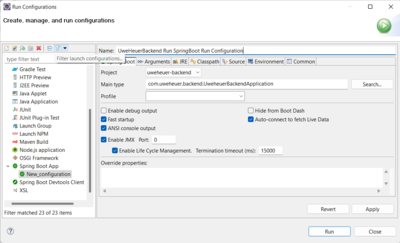
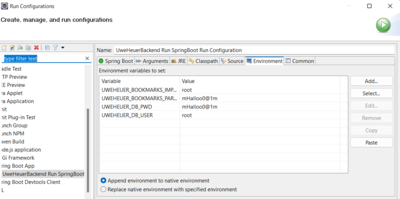
- this creates a file
UweHeuerBackend Run SpringBoot Run Configuration.launchin C:\Uwes\SoftwareProjects\eclipse-workspace\.metadata\.plugins\org.eclipse.debug.core\.launches\- if eclipse error occurs and run configuration is empty see here. Add the two missing lines with value of project name 'uweheuer-backend'.
- this creates a file


Raspberry Hostinterface
export UWEHEUER_HOSTINTERFACE_UPDATESOFTWARE_SCRIPT=/home/uwe/SoftwareProjects/eclipse-workspace/uweheuer-backend/BuildAndRunRaspberry.sh
nohup mvn spring-boot:run & // check by ps -e
Docker Compose
- configuration see
docker-compose.ymland.compose.env
Local Windows Laptop
- start Docker Desktop
- run all containers
C:\Uwes\SoftwareProjects\eclipse-workspace\uweheuer-backend>docker compose --env-file .compose.env up -d
- log files go to
CONTAINER_LOGS_FOLDER=C:/Uwes/ContainerLogs/uweheuerbackend (see .compose.env)
- database goes to
MYSQL_DB_FOLDER=C:/Uwes/MySQLContainerData/uweheuerbackend (see .compose.env)
Raspberry
uwe@raspberrypi4:~/SoftwareProjects/eclipse-workspace/uweheuer-backend $ docker compose --env-file .compose.env up -d // using an local env file, run in background
- stop all containers
uwe@raspberrypi4:~/SoftwareProjects/eclipse-workspace/uweheuer-backend $ docker compose --env-file .compose.env down
Implementation
Spring Boot Standard Diagnosis Actuator
- adding Spring Boot Actuator by adding to pom.xml:
<dependency>
  <groupId>org.springframework.boot</groupId>
  <artifactId>spring-boot-starter-actuator</artifactId>
</dependency>
- adding to application.properties all endpoints
management.endpoints.web.exposure.include=*
- add class
ActuatorHttpExchangesConfigurationfor HTTP request logging
Calling Host from Backend Container
- add to
pom.xml
<dependency>
  <groupId>org.springframework.boot</groupId>
  <artifactId>spring-boot-starter-webflux</artifactId>
</dependency>
- implement using WebClient
Set Build Timestamp
- see
pom.xmlbelowspring-boot-maven-pluginand AdminController.javaBuildPropertiesattribute
Logging
- uses Logback
- see
/src/main/resource/log-back-spring.xml- log files go to
/logs/directory, which is in case of Docker mapped Docker Compose Configuration - pattern
- %C{0} // print out without package name
- %M // print out method name
- log files go to
- in a Docker environment
/logs/is mapped via.compose.envto a local machine directory