
EDTLaptop2: Difference between revisions
| (26 intermediate revisions by the same user not shown) | |||
| Line 1: | Line 1: | ||
==Specification== | ==Specification== | ||
* Hostname EW10LAP1009143 | |||
* [[File:EDTLaptopAfterLoss1.PNG|400px]] | * [[File:EDTLaptopAfterLoss1.PNG|400px]] | ||
* [[File:20220620_125536.jpg|400px]] | * [[File:20220620_125536.jpg|400px]] | ||
| Line 10: | Line 11: | ||
==Programs== | ==Programs== | ||
===Angular=== | |||
* see [[Angular#Installation|General Installation]] | |||
===Chrome=== | |||
====Cookie Banner Plugin==== | |||
* installation according to [https://www.verbraucherzentrale.de/digitale-welt/browserplugin-nervenschoner-endlich-ungestoert-surfen-74152 here] | |||
===Curl=== | |||
* unzipped to C:\Uwes\Programme\curl\curl-7.84.0_9-win64-mingw | |||
* extend the PATH | |||
===Docker Desktop=== | ===Docker Desktop=== | ||
* ordered [[File:Docker1.png|400px]] | |||
* via E.ON Software Center | * via E.ON Software Center | ||
===Draw.io=== | |||
* C:\Uwes\Programme\draw.io\ | |||
===Eclipse=== | ===Eclipse=== | ||
| Line 18: | Line 34: | ||
* extracted to <code>C:\Uwes\Programme\eclipse\eclipse 2022-06\</code> | * extracted to <code>C:\Uwes\Programme\eclipse\eclipse 2022-06\</code> | ||
* set workspace directory to <code>C:\Uwes\Programme\eclipse\workspace\</code> | * set workspace directory to <code>C:\Uwes\Programme\eclipse\workspace\</code> | ||
* installation details see Help -> About Eclipse -> Installation Details shows: | |||
** Git | |||
* Java home in Help -> About Eclipse -> Installation Details -> java.home=C:\Uwes\Programme\eclipse\eclipse 2022-06\plugins\org.eclipse.justj.openjdk.hotspot.jre.full.win32.x86_64_17.0.3.v20220515-1416\jre or | |||
* Installed JRE Window -> Preferences -> Java -> Installed JREs | |||
====Egit==== | |||
* created personal access token (PAT) via GitHub portal named 'Demo1 Eclipse' to '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' | |||
* entered it once when pushing | |||
====Spring Tools==== | ====Spring Tools==== | ||
* eclipse -> Help -> Marketplace -> select Spring Tools 4 | * eclipse -> Help -> Marketplace -> select Spring Tools 4 | ||
====Lombok==== | |||
* downlaod from lombok.jar from https://projectlombok.org/download | |||
* run java.exe -jar lombok.jar from <ECliPSE_DIR>\...\ | |||
====Configuration==== | ====Configuration==== | ||
* [[Eclipse#Configuration_of_Version_2022-06|here]] | * [[Eclipse#Configuration_of_Version_2022-06|here]] | ||
===Firefox=== | |||
===Git=== | ===Git=== | ||
| Line 31: | Line 61: | ||
git --version | git --version | ||
git version 2.36.1.windows.1 | git version 2.36.1.windows.1 | ||
===Heroku=== | |||
* download the 64bit installer | |||
* install to <code>C:\Uwes\Programme\heroku</code> | |||
* check by | |||
heroku | |||
===HTTP Server (node.js)=== | |||
C:\Uwes\Programme\eclipse\workspace\uweheuer-frontend>npm install --global http-server // install globally | |||
call e.g. by | |||
http-server -p 8082 -c-1 dist/uweheuer-frontend // http://127.0.0.1:8082, -c-1 means no caching | |||
<CTRL>+<C> // to stop | |||
===Maven=== | |||
* extract to C:\Uwes\Programme\apache-maven-3.8.6\bin | |||
* extend Path | |||
* set JAVA_HOME to Eclipse JRE (ava.home=C:\Uwes\Programme\eclipse\eclipse 2022-06\plugins\org.eclipse.justj.openjdk.hotspot.jre.full.win32.x86_64_17.0.3.v20220515-1416\jre) | |||
* mvn -version | |||
===Node.js=== | |||
* download from https://nodejs.org/en/ | |||
* installation to <code>C:\Uwes\Programme\nodejs\</code> | |||
node -v // prints v16.17.0 | |||
npm -v // prints 8.15.0 | |||
===OwnCloud=== | ===OwnCloud=== | ||
| Line 37: | Line 91: | ||
* setup with server 'https://uweheuer.spdns.de/owncloud/', username and password, and target folder | * setup with server 'https://uweheuer.spdns.de/owncloud/', username and password, and target folder | ||
[[File:owncloud1.PNG|400px]] | [[File:owncloud1.PNG|400px]] | ||
===Postgres=== | |||
* led to error, but | |||
C:\Uwes\Programme\PostgreSQL\14\bin>.\psql.exe | |||
works | |||
* added C:\Uwes\Programme\PostgreSQL\14\bin added to path | |||
===Postman=== | |||
* installation to <code>C:\Users\U1728\AppData\Local\Postman\Postman.exe</code> | |||
===Putty=== | ===Putty=== | ||
* download from https://winscp.net/download/putty-0.77-installer.msi | * download from https://winscp.net/download/putty-0.77-installer.msi | ||
* installation to <code>C:\Uwes\Programme\WinSCP\PuTTY\</code> | * installation to <code>C:\Uwes\Programme\WinSCP\PuTTY\</code> | ||
===Visual Studio Code=== | |||
* <code>C:\Uwes\Programme\Microsoft VS Code\</code> | |||
===WinSCP=== | ===WinSCP=== | ||
Latest revision as of 09:52, 9 November 2022
Specification[edit]
- Hostname EW10LAP1009143
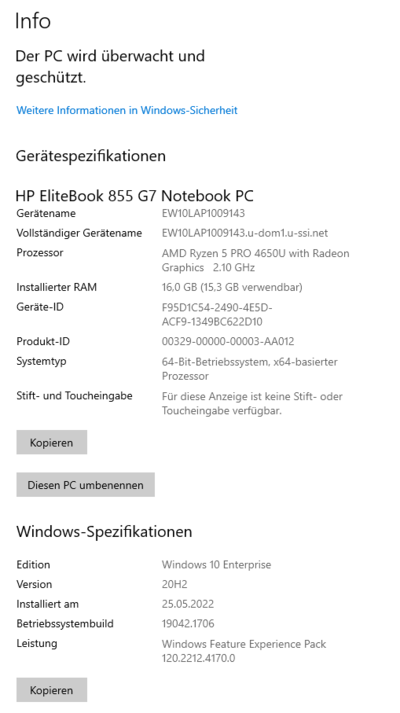
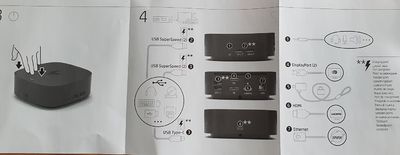


Configuration[edit]
Windows[edit]
Show Hidden Directories and Files[edit]
- type 'folder' in task bar search box
- select 'show ...'
Programs[edit]
Angular[edit]
Chrome[edit]
Cookie Banner Plugin[edit]
- installation according to here
Curl[edit]
- unzipped to C:\Uwes\Programme\curl\curl-7.84.0_9-win64-mingw
- extend the PATH
Docker Desktop[edit]
- ordered

- via E.ON Software Center

Draw.io[edit]
- C:\Uwes\Programme\draw.io\
Eclipse[edit]
- download 'Eclipse IDE for Enterprise Java and Web Developers' from https://www.eclipse.org/downloads/packages/
- extracted to
C:\Uwes\Programme\eclipse\eclipse 2022-06\ - set workspace directory to
C:\Uwes\Programme\eclipse\workspace\ - installation details see Help -> About Eclipse -> Installation Details shows:
- Git
- Java home in Help -> About Eclipse -> Installation Details -> java.home=C:\Uwes\Programme\eclipse\eclipse 2022-06\plugins\org.eclipse.justj.openjdk.hotspot.jre.full.win32.x86_64_17.0.3.v20220515-1416\jre or
- Installed JRE Window -> Preferences -> Java -> Installed JREs
Egit[edit]
- created personal access token (PAT) via GitHub portal named 'Demo1 Eclipse' to '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'
- entered it once when pushing
Spring Tools[edit]
- eclipse -> Help -> Marketplace -> select Spring Tools 4
Lombok[edit]
- downlaod from lombok.jar from https://projectlombok.org/download
- run java.exe -jar lombok.jar from <ECliPSE_DIR>\...\
Configuration[edit]
Firefox[edit]
Git[edit]
- download Git-2.27.0-64-bit.ext from here
- Installed to
C:\Uwes\Programme\Git - PATH variable extended to
C:\Uwes\Programme\Git\cmd\
git --version
git version 2.36.1.windows.1
Heroku[edit]
- download the 64bit installer
- install to
C:\Uwes\Programme\heroku - check by
heroku
HTTP Server (node.js)[edit]
C:\Uwes\Programme\eclipse\workspace\uweheuer-frontend>npm install --global http-server // install globally
call e.g. by
http-server -p 8082 -c-1 dist/uweheuer-frontend // http://127.0.0.1:8082, -c-1 means no caching
<CTRL>+<C> // to stop
Maven[edit]
- extract to C:\Uwes\Programme\apache-maven-3.8.6\bin
- extend Path
- set JAVA_HOME to Eclipse JRE (ava.home=C:\Uwes\Programme\eclipse\eclipse 2022-06\plugins\org.eclipse.justj.openjdk.hotspot.jre.full.win32.x86_64_17.0.3.v20220515-1416\jre)
- mvn -version
Node.js[edit]
- download from https://nodejs.org/en/
- installation to
C:\Uwes\Programme\nodejs\
node -v // prints v16.17.0
npm -v // prints 8.15.0
OwnCloud[edit]
- download client from https://owncloud.com/de/desktop-app/
- create folder
C:\Uwes\owncloud\ - setup with server 'https://uweheuer.spdns.de/owncloud/', username and password, and target folder

Postgres[edit]
- led to error, but
C:\Uwes\Programme\PostgreSQL\14\bin>.\psql.exe
works
- added C:\Uwes\Programme\PostgreSQL\14\bin added to path
Postman[edit]
- installation to
C:\Users\U1728\AppData\Local\Postman\Postman.exe
Putty[edit]
- download from https://winscp.net/download/putty-0.77-installer.msi
- installation to
C:\Uwes\Programme\WinSCP\PuTTY\
Visual Studio Code[edit]
C:\Uwes\Programme\Microsoft VS Code\
WinSCP[edit]
- download from https://winscp.net/download/WinSCP-5.21-Setup.exe
- installation to
C:\Uwes\Programme\WinSCP\ - manual installation of Putty and setting path via preferences
XAMPP[edit]
- configurations via config in console in
httpd.conf
Listen 8090
ServerName localhost:8090