
EDTLaptop3
System
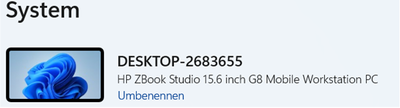
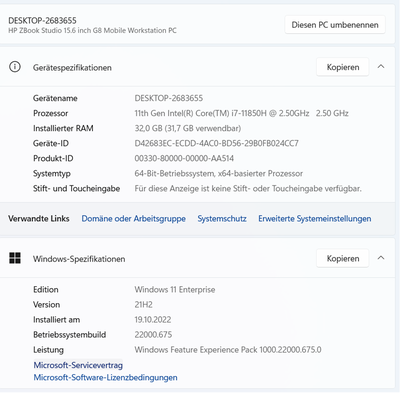
- disc 500GB


Installations
Anaconda
Progs are in:
C:\Users\U1728\AppData\Roaming\Microsoft\Windows\Start Menu\Programs\Anaconda3 (64-bit)
=Change root for Jupyter
- start Anaconda prompt
C:\Users\U1728>jupyter notebook --generate-config
Writing default config to: C:\Users\U1728\.jupyter\jupyter_notebook_config.py
- edit config fily
Angular
npm install -g @angular/cli // -g installs Angular CLI it globally, not project-specific
ng version // prints version 14.2.8
Chrome Cookie Banner Blocker
- download from here
- extract to
C:\Uwes\nervenschoner.chromium\ - installation in Chrome does not work
Docker
- installation via Eon service request did not work (INC2441412)
- download docker windows installation via command line (via browser it is blocked)
- execute installer (target directory could not be specified)
- first start led to the error message
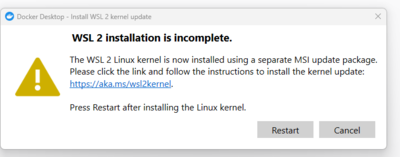
- link executed (but w/o installation of a linux distribution)
- login with Docker desktop with uwe.heuer@eon.com (see old mail with welcome to Eon community)
- Docker Desktop has to be started manually to start the Docker host

draw.io
- installation to
C:\Uwes\Programme\draw.io\
Eclipse
- installation to
C:\Uwes\Programme\eclipse\jee-2022-09\ - set workspace to
C:\Uwes\SoftwareProjects\eclipse-workspace\ - configuration see here
Lombok
- download Lombok from https://search.maven.org/search?q=g:org.projectlombok%20AND%20a:lombok&core=gav
- C:\Users\U1728\.p2\pool\plugins\org.eclipse.justj.openjdk.hotspot.jre.full.win32.x86_64_17.0.5.v20221102-0933\jre\bin\java.exe -jar lombok-1.18.24.jar
- select installation directory of eclipse
Spring Tools
- eclipse -> Help -> Marketplace -> select Spring Tools 4
Git
- download from here
- installed to
C:\Uwes\Programme\Git
C:\Uwes\Programme\Git>git --version
  git version 2.38.1.windows.1
git config --global user.email uwe.heuer@gmail.com
git config --global user.name UweHeuer
HTTP Server (node.js)
C:\Uwes\SoftwareProjects\uweheuer-frontend>npm install --global http-server // install globally
call e.g. by
http-server -p 8082 -c-1 dist/uweheuer-frontend // http://127.0.0.1:8082, -c-1 means no caching
<CTRL>+<C> // to stop
Java
- use Java runtime from eclipse
- set JAVA_HOME for system to
C:\Users\U1728\.p2\pool\plugins\org.eclipse.justj.openjdk.hotspot.jre.full.win32.x86_64_17.0.5.v20221102-0933\jre
C:\Users\U1728>%JAVA_HOME%\bin\java -version
  openjdk version "17.0.5" 2022-10-18
  OpenJDK Runtime Environment Temurin-17.0.5+8 (build 17.0.5+8)
  OpenJDK 64-Bit Server VM Temurin-17.0.5+8 (build 17.0.5+8, mixed mode)
Maven
- download apache-maven-3.8.6-bin.zip
- extract to
C:\Uwes\Programme\apache-maven-3.8.6\ - extend system path to
C:\Uwes\Programme\apache-maven-3.8.6\bin
C:\Users\U1728>mvn -version
  Apache Maven 3.8.6 (84538c9988a25aec085021c365c560670ad80f63)
  Maven home: C:\Uwes\Programme\apache-maven-3.8.6
  Java version: 17.0.5, vendor: Eclipse Adoptium, runtime: C:\Users\U1728\.p2\pool\plugins\org.eclipse.justj.openjdk.hotspot.jre.full.win32.x86_64_17.0.5.v20221102-0933\jre
  Default locale: de_DE, platform encoding: Cp1252
  OS name: "windows 11", version: "10.0", arch: "amd64", family: "windows"
Node.js (NPM)
- download 18.12.0 LTO from here
- installation to
C:\Uwes\Programme\nodejs\
node -v // prints v18.12.0
npm -v // prints 8.19.2
OwnCloud
- download client from https://owncloud.com/de/desktop-app/
- installation to
C:\Uwes\Programme\owncloud\ - create folder
C:\Uwes\owncloud\for data - setup with server 'https://uweheuer.spdns.de/owncloud/', uwe.heuer@gmail.com and <STANDARD>, and target folder
C:\Uwes\owncloud\
Postman
- installation by CHIP installer somewhere in the Windows system
- login via Google account
PuTTY
- installation to
C:\Uwes\Programme\WinSCP\PuTTY\
Uwe Heuer
Uwe Heuer Frontend
C:\Uwes\SoftwareProjects>git clone https://github.com/UweHeuer/uweheuer-frontend.git // creates directory uweheuer-frontend
Uwe Heuer Backend
C:\Uwes\SoftwareProjects\eclipse-workspace>git clone https://github.com/UweHeuer/uweheuer-backend.git
- and see here
Visual Studio Code
- download User Installer
- installation to
C:\Users\U1728\AppData\Local\Programs\Microsoft VS Code\
Angular Language Service Plug-In
WinMerge
- download from Chip
- installation to
C:\Uwes\Programme\WinMerge\
WinSCP
- download from https://winscp.net/download/WinSCP-5.21-Setup.exe
- installation to
C:\Uwes\Programme\WinSCP\ - in logon screen import
C:\Uwes\owncloud\documents\WinSCP\*.ini - configure WinMerge as compare tool by here
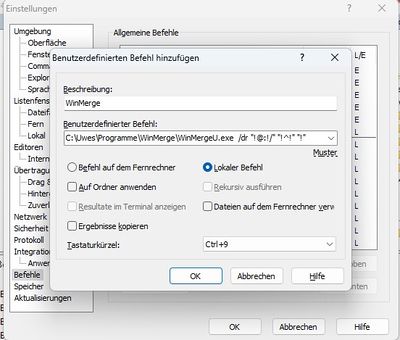
- select both file and call WinMerge

Xampp
- installation to
C:\Uwes\Programme\xampp\ - http://localhost/dashboard/
MySQL
- due to error
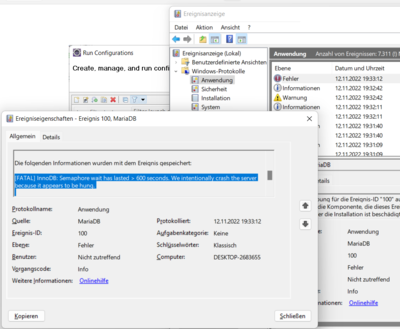 increased in my.ini

innodb_buffer_pool_size=256
- set root password by
C:\Uwes\Programme\xampp\mysql\bin>mysqladmin.exe -u root password <Lm><STANDARD><Lm>
- and set it in
C:\Uwes\Programme\xampp\phpMyAdmin\config.inc
$cfg['Servers'][$i]['password']